
In today’s fast-moving digital business environment, organizations handle thousands of Word documents, Excel spreadsheets, and PowerPoint presentations every day. Manual editing, file management, data correction, document splitting, and merging tasks consume valuable working hours and reduce team productivity.
Modern businesses need smarter office automation solutions that eliminate repetitive work, improve accuracy, and save time.
This is where LantechSoft office automation software solutions become essential.
Whether you are a corporate office, legal firm, educational institution, marketing agency, publishing company, data processing center, or enterprise business, LantechSoft provides powerful batch processing tools designed to automate document management tasks with speed and precision.
According to productivity experts, automation significantly reduces repetitive office workloads and improves operational efficiency across departments.
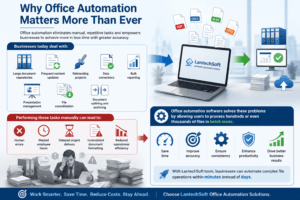
Why Office Automation Matters More Than Ever
Businesses today deal with:
- Large document repositories
- Frequent content updates
- Rebranding projects
- Data corrections
- Bulk reporting
- Presentation management
- File consolidation
- Document splitting and archiving
Performing these tasks manually can lead to:
- Human errors
- Wasted employee hours
- Delayed project delivery
- Inconsistent document formatting
- Reduced operational efficiency
Office automation software solves these problems by allowing users to process hundreds or even thousands of files in batch mode.
With LantechSoft tools, businesses can automate complex file operations within minutes instead of days.
Advanced Word Find & Replace Tool – Smart Editing for Bulk Word Documents
Advance Word Find & Replace
Managing multiple Word documents manually is one of the most time-consuming office tasks. Businesses often need to update company names, product information, legal clauses, pricing details, or formatting across hundreds of files.
The Advance Word Find & Replace tool automates this process with powerful batch find-and-replace functionality.
Key Features
- Batch find and replace in Word files
- Supports DOC, DOCX, and RTF formats
- Replace text with formatting
- Highlight replaced text
- Wildcard support
- Case-sensitive search
- Bulk document processing
- Fast and accurate replacement engine
This tool is ideal for:
- Legal firms
- Publishers
- HR departments
- Government offices
- Content agencies
- Educational organizations
Instead of manually editing hundreds of files, users can automate replacements across all documents instantly.
Excel Find & Replace Batch – Advanced Spreadsheet Automation
Excel Find & Replace Batch
Excel files are critical for finance, analytics, reporting, inventory management, and business operations. Updating spreadsheet data manually across multiple workbooks can be extremely difficult and error-prone.
The Excel Find & Replace Batch tool allows businesses to automate data replacement tasks across multiple Excel files simultaneously.
Features Include
- Batch search and replace in XLS, XLSX, XLSM files
- Replace across all sheets
- Match entire cell content
- Format replaced text
- Support for wildcard characters
- Bulk file processing
- Generate process logs
- Separate output folder management
This software is perfect for:
- Accountants
- Financial analysts
- Data management teams
- MIS departments
- Inventory managers
- Enterprise reporting teams
The software dramatically reduces spreadsheet editing time while improving accuracy and consistency.
PowerPoint Find & Replace Batch – Simplify Presentation Editing
PowerPoint Find & Replace Batch
Updating text manually across multiple PowerPoint presentations can be exhausting, especially during branding updates, corporate campaigns, or client revisions.
The PowerPoint Find & Replace Batch software helps users automate text replacement in bulk PowerPoint files.
Major Benefits
- Batch replace text in PPT and PPTX files
- Replace across all slides
- Fast processing engine
- Maintain presentation formatting
- Reduce manual editing workload
- Improve presentation consistency
This tool is highly useful for:
- Marketing agencies
- Sales teams
- Trainers
- Educational institutions
- Corporate communication departments
Businesses can instantly update presentations without opening files individually.
Excel File Binder – Merge Multiple Excel Files Easily
Excel File Binder
Organizations often work with multiple Excel reports from different departments or branches. Combining them manually is slow and frustrating.
The Excel File Binder software allows users to merge multiple Excel files into a single workbook efficiently.
Key Advantages
- Combine multiple Excel files
- Preserve worksheet structure
- Save reporting time
- Simplify data consolidation
- Improve workflow management
Perfect for:
- Financial reporting
- Monthly MIS reporting
- Inventory consolidation
- Business analytics
- Multi-branch reporting systems
PowerPoint Splitter Tool – Divide Large Presentations Instantly
PowerPoint Splitter Tool
Large PowerPoint presentations can become difficult to manage, share, and organize.
The PowerPoint Splitter Tool enables users to split presentations into smaller files quickly.
Features
- Split PowerPoint presentations slide-wise
- Create separate presentation files
- Faster file organization
- Easy content distribution
- Improved presentation management
This software is especially useful for:
- Corporate trainers
- Educational institutions
- Sales teams
- Seminar organizers
- Marketing agencies
PowerPoint Binder Tool – Combine Presentations Efficiently
PowerPoint Binder Tool
Need to combine multiple presentations into one master file?
The PowerPoint Binder Tool automates PowerPoint merging with ease.
Benefits
- Merge multiple PPT/PPTX files
- Maintain slide formatting
- Save hours of manual work
- Create unified presentations
- Improve team collaboration
Ideal for:
- Corporate reporting
- Training modules
- Business presentations
- Educational content creation
Word Document Binder – Merge Multiple Word Files into One
Word Document Binder
Businesses often need to combine reports, contracts, manuals, or chapters into a single document.
The Word Document Binder simplifies this process.
Features
- Merge multiple Word files
- Preserve document formatting
- Create master reports instantly
- Easy document consolidation
- Batch processing support
Useful for:
- Legal firms
- Publishers
- Corporate documentation teams
- Government departments
- Research institutions
Word Document Splitter – Organize Documents More Efficiently
Word Document Splitter
Large Word files are difficult to share and manage. The Word Document Splitter allows users to divide documents into smaller files automatically.
Main Features
- Split Word files page-wise
- Divide documents by sections
- Faster document organization
- Better file management
- Save manual editing time
Ideal for:
- Publishing companies
- HR departments
- Legal documentation
- Educational organizations
- Enterprise document management
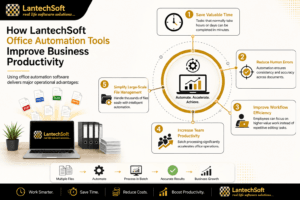
How LantechSoft Office Automation Tools Improve Business Productivity
Using office automation software delivers major operational advantages:
1. Save Valuable Time
Tasks that normally take hours or days can be completed in minutes.
2. Reduce Human Errors
Automation ensures consistency and accuracy across documents.
3. Improve Workflow Efficiency
Employees can focus on higher-value work instead of repetitive editing tasks.
4. Increase Team Productivity
Batch processing significantly accelerates office operations.
5. Simplify Large-Scale File Management
Handle thousands of files easily with intelligent automation.
Industries That Benefit from LantechSoft Automation Tools
LantechSoft software solutions are widely useful across industries:
- Corporate offices
- Financial institutions
- Legal firms
- Government departments
- Educational organizations
- Marketing agencies
- Publishing companies
- Data processing centers
- Research organizations
- Healthcare administration
Why Choose LantechSoft?
LantechSoft has developed specialized office automation software designed to simplify complex document management tasks.
What Makes LantechSoft Different?
- Easy-to-use interface
- High-speed batch processing
- Advanced automation features
- Reliable document handling
- Multi-format support
- Professional-grade solutions
- Trusted by businesses worldwide
The company continues to develop innovative software tools that help organizations automate repetitive office work efficiently.
Final Thoughts
Office automation is no longer optional in modern business environments. Organizations that continue relying on manual document processing lose valuable time, productivity, and operational efficiency.
The powerful software suite from LantechSoft helps businesses automate repetitive tasks, improve workflow management, reduce errors, and save countless working hours.
Whether you need to:
- Find and replace text in bulk files
- Merge multiple documents
- Split large files
- Automate spreadsheet editing
- Manage PowerPoint presentations efficiently
LantechSoft provides professional-grade solutions designed for modern office productivity.
Explore the complete software collection today:
