
SMS and Email Marketing Software has become an important part of modern business communication. Businesses need reliable ways to communicate with customers, leads, subscribers, clients, and partners without spending hours sending individual messages.
Whether you want to promote a new product, announce a special offer, follow up with leads, share business updates, invite customers to an event, or communicate with a large database, the right SMS and Email Marketing Software can make the process faster, easier, and more organized.
LantechSoft provides two desktop software solutions designed to help businesses manage different communication channels: Android Bulk SMS Sender Unlimited for bulk SMS campaigns and Bulk Mailer Pro for bulk email campaigns.
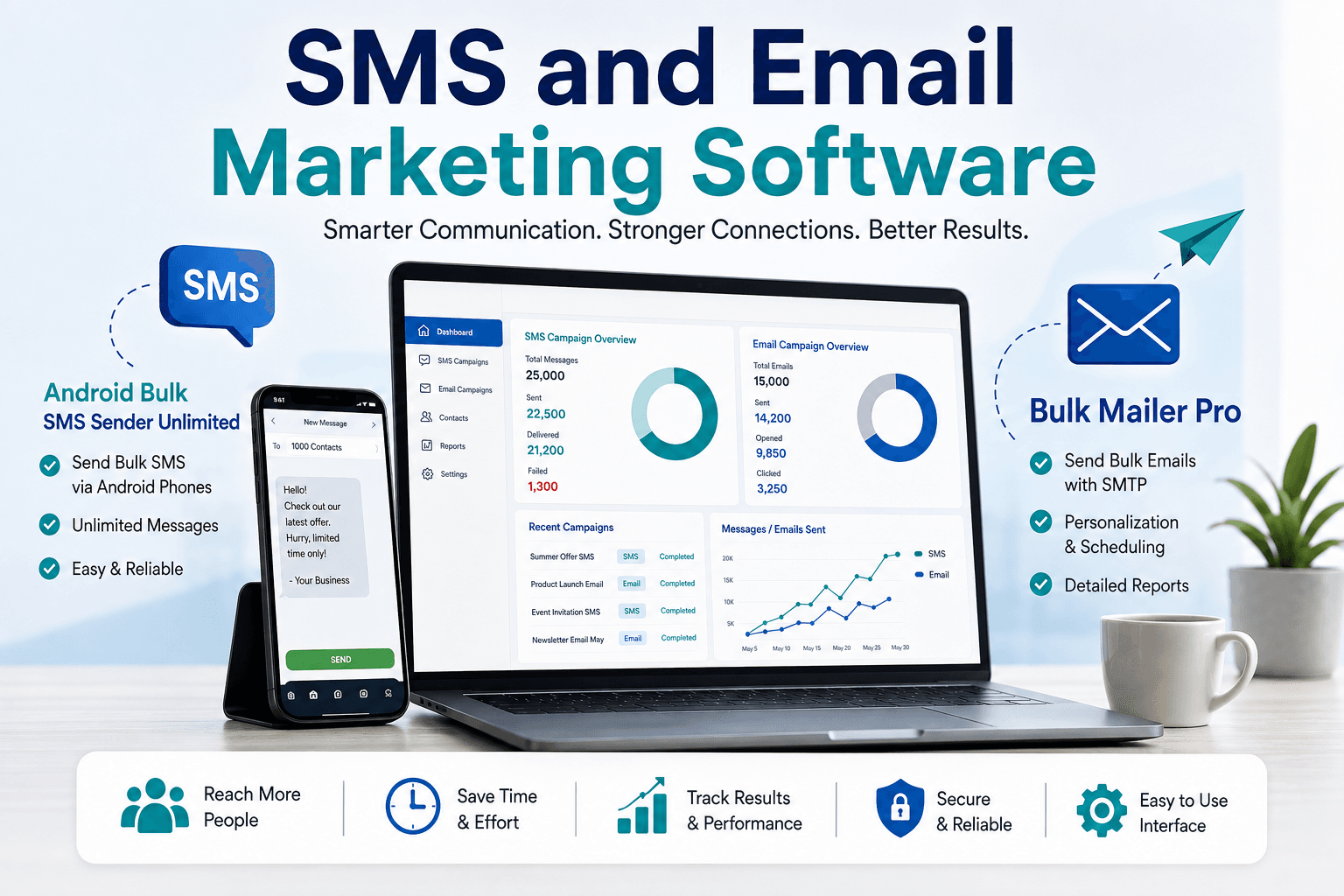
These two products can be used separately or as part of a broader SMS and email marketing strategy. Android Bulk SMS Sender enables users to send SMS through connected Android smartphones from a Windows PC, while Bulk Mailer Pro is designed for sending bulk email campaigns using configured email accounts and SMTP services.
In this guide, we will explore how SMS and Email Marketing Software can support business communication, what features to look for, and how LantechSoft’s two software solutions can help simplify bulk messaging and email campaigns.
Table of Contents
- What Is SMS and Email Marketing Software?
- Why Businesses Need SMS and Email Marketing Software
- SMS Marketing vs Email Marketing
- Android Bulk SMS Sender Unlimited
- Key Features of Android Bulk SMS Sender
- How Android Bulk SMS Sender Works
- Bulk Mailer Pro
- Key Features of Bulk Mailer Pro
- How Bulk Mailer Pro Works
- Using SMS and Email Marketing Software Together
- Benefits for Small Businesses
- Benefits for Marketing Agencies
- Benefits for Sales Teams
- Personalization in Bulk Marketing
- Choosing the Right Bulk Messaging Software
- SMS and Email Marketing Best Practices
- Frequently Asked Questions
- Conclusion
What Is SMS and Email Marketing Software?
SMS and Email Marketing Software refers to software tools that help businesses manage large-scale communication through SMS and email.
Instead of manually sending individual messages, businesses can prepare contact lists, create campaigns, personalize content, and manage communication from a centralized system.
SMS and email have different strengths.
SMS is useful for short and time-sensitive communication, while email provides more space for detailed information, images, links, offers, and business communication.
A business might use SMS to notify customers about a limited-time offer and email to provide the complete details of that offer.
This makes SMS and email complementary communication channels rather than competing channels.
LantechSoft’s Android Bulk SMS Sender and Bulk Mailer Pro are designed around these two different communication requirements.
Why Businesses Need SMS and Email Marketing Software
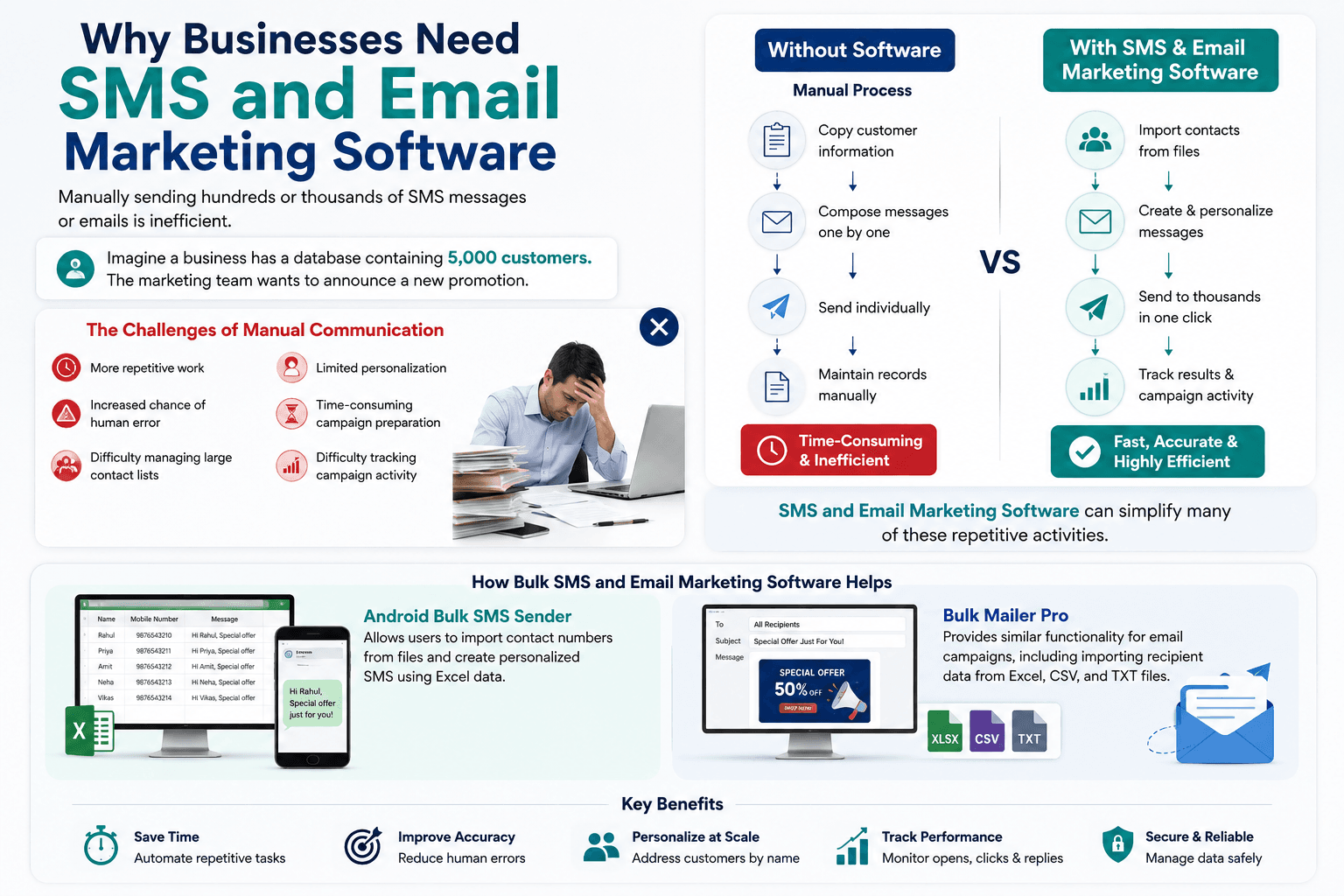
Manually sending hundreds or thousands of SMS messages or emails is inefficient.
Imagine a business has a database containing 5,000 customers.
The marketing team wants to announce a new promotion.
Without bulk communication software, employees may need to copy customer information, compose messages, send emails individually, and maintain records manually.
This creates several problems:
- More repetitive work
- Increased chance of human error
- Difficulty managing large contact lists
- Limited personalization
- Time-consuming campaign preparation
- Difficulty tracking campaign activity
SMS and Email Marketing Software can simplify many of these repetitive activities.
Businesses can prepare their contact lists, create messages, personalize campaigns, and manage bulk communication through dedicated software.
For example, Android Bulk SMS Sender allows users to import contact numbers from files and create personalized SMS using Excel data. Bulk Mailer Pro provides similar functionality for email campaigns, including importing recipient data from Excel, CSV, and TXT files.
SMS Marketing vs Email Marketing
SMS and email are both valuable communication channels, but they are useful for different types of messages.
SMS Marketing
SMS is generally better suited for short messages such as:
- Promotional alerts
- Event reminders
- Appointment notifications
- Customer updates
- Short offers
- Business announcements
- Lead follow-ups
- Time-sensitive information
Android Bulk SMS Sender is designed to help businesses manage this type of communication through connected Android smartphones.
Email Marketing
Email is more suitable when you need to provide additional information.
Businesses can use email for:
- Newsletters
- Product announcements
- Detailed offers
- Business communication
- Product information
- Event invitations
- Customer education
- B2B communication
Bulk Mailer Pro supports bulk email campaigns and allows users to import recipient information, personalize messages, and attach files.
Why Use Both?
A strong communication strategy can combine both channels.
For example:
Email: Send detailed information about a new product.
SMS: Send a short reminder about the product launch.
This approach gives businesses more flexibility when communicating with different audiences.
Android Bulk SMS Sender Unlimited
Android Bulk SMS Sender Unlimited is a desktop SMS marketing software solution from LantechSoft designed to send SMS messages through one or multiple Android smartphones connected to a Windows PC.
The current LantechSoft product page lists support for Android 8 through Android 13 and a two-year license validity.
Explore Android Bulk SMS Sender Unlimited
The software uses the SMS Sender Modem Pro Android application to establish communication between the Android phone and the desktop software. Multiple Android phones can be connected, allowing businesses to manage SMS communication from a central PC.
This makes the software particularly useful for businesses that already have Android smartphones and SIM-based SMS plans.
Key Features of Android Bulk SMS Sender
Send Bulk SMS Through Android Phones
One of the main advantages of Android Bulk SMS Sender is its ability to use connected Android smartphones for SMS communication.
The desktop application provides a centralized interface for managing SMS campaigns instead of requiring users to operate every phone separately.
According to LantechSoft, multiple Android smartphones can be connected simultaneously.
Connect Multiple Android Devices
Businesses with larger SMS requirements can connect multiple Android phones.
The actual sending capacity depends on factors such as:
- Number of connected devices
- Mobile carrier
- SIM plan
- Available SMS balance
- Campaign configuration
LantechSoft states that multiple Android smartphones can be connected simultaneously to increase message sending capacity.
Import Contacts from Files
Managing hundreds or thousands of mobile numbers manually can be difficult.
Android Bulk SMS Sender allows users to load contact numbers from files, including Excel and text-based formats.
This is particularly useful for businesses that already maintain customer information in spreadsheets.
A typical database might contain:
| Name | Mobile Number | City | Customer Type |
|---|---|---|---|
| Rahul | 98XXXXXXXX | Delhi | Customer |
| Amit | 97XXXXXXXX | Mumbai | Lead |
| Neha | 99XXXXXXXX | Jaipur | Customer |
| Priya | 96XXXXXXXX | Lucknow | Lead |
The information can then be used to create targeted SMS campaigns.
Personalized SMS Messages
Sending the same generic message to every customer is not always the best approach.
Personalized communication can make a campaign more relevant.
For example:
Generic SMS:
“Special offer available today. Contact us now.”
Personalized SMS:
“Hi Rahul, your special offer is available today. Contact us to learn more.”
Android Bulk SMS Sender supports personalized SMS using Excel data and custom fields.
Businesses can therefore create different messages for individual recipients while managing the campaign from a single desktop application.
Unicode and Multilingual SMS
Businesses often communicate with customers in different languages.
Android Bulk SMS Sender supports Unicode SMS and can be used for languages including Hindi, Arabic, Bengali, Tamil, Telugu, Gujarati, Urdu, and others.
This can be particularly useful for:
- Regional businesses
- Educational organizations
- Local service providers
- Travel companies
- Retail businesses
- International organizations
Multilingual SMS can make customer communication more accessible to different audiences.
Schedule SMS Campaigns
Not every campaign needs to be sent immediately.
Android Bulk SMS Sender supports scheduling campaigns for future delivery.
Scheduling can be useful for:
- Event reminders
- Planned promotions
- Appointment notifications
- Holiday messages
- Product announcements
- Scheduled customer communication
Marketing teams can prepare campaigns in advance and schedule them for the appropriate time.
SMS Logs
Managing large campaigns requires visibility into sending activity.
Android Bulk SMS Sender maintains logs of sent and failed SMS messages, including information such as numbers, messages, and dates.
These logs can help businesses review campaign activity and identify unsuccessful messages.
How Android Bulk SMS Sender Works
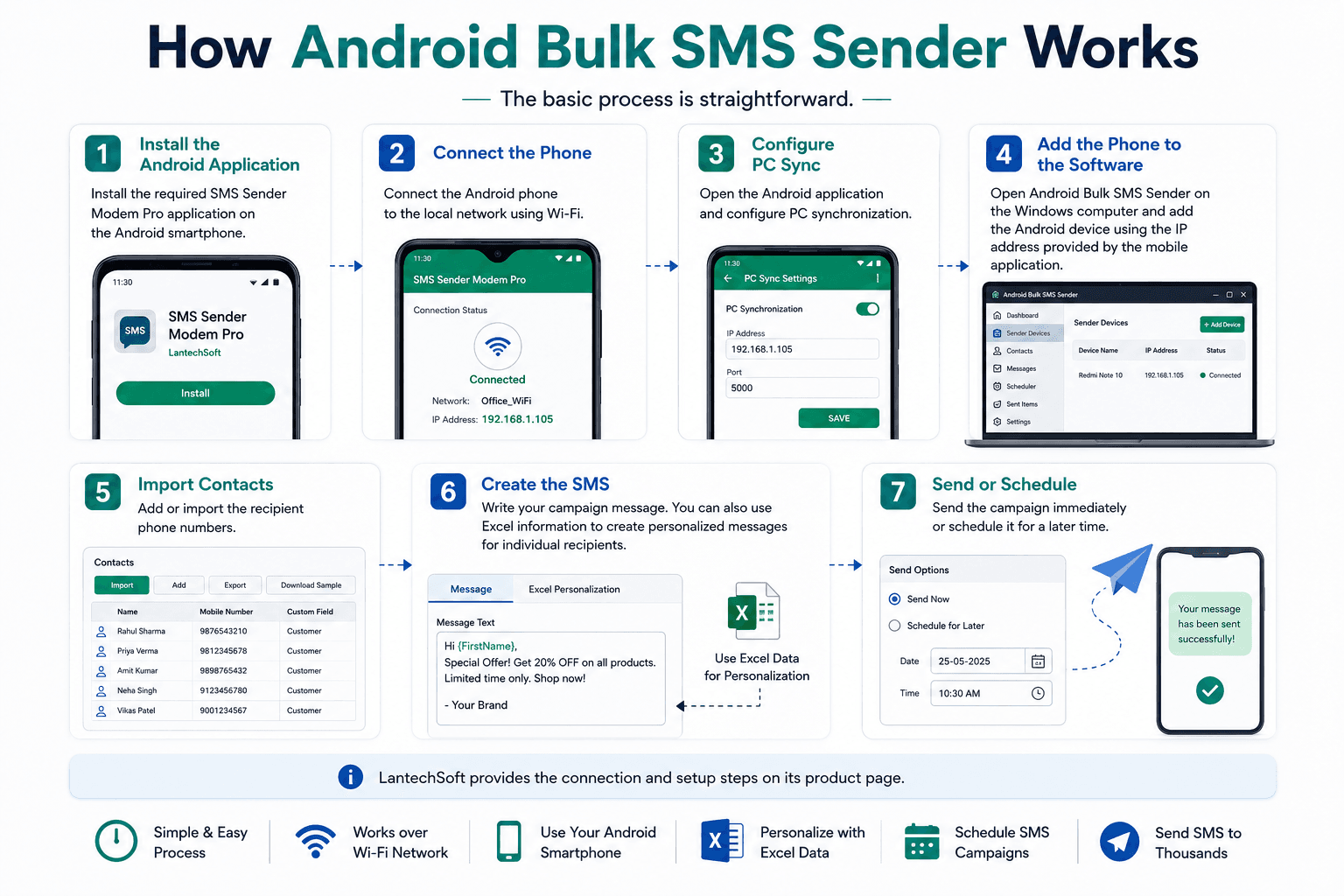
The basic process is straightforward.
Step 1: Install the Android Application
Install the required SMS Sender Modem Pro application on the Android smartphone.
Step 2: Connect the Phone
Connect the Android phone to the local network using Wi-Fi.
Step 3: Configure PC Sync
Open the Android application and configure PC synchronization.
Step 4: Add the Phone to the Software
Open Android Bulk SMS Sender on the Windows computer and add the Android device using the IP address provided by the mobile application.
Step 5: Import Contacts
Add or import the recipient phone numbers.
Step 6: Create the SMS
Write your campaign message.
You can also use Excel information to create personalized messages for individual recipients.
Step 7: Send or Schedule
Send the campaign immediately or schedule it for a later time.
LantechSoft provides the connection and setup steps on its product page.
Bulk Mailer Pro
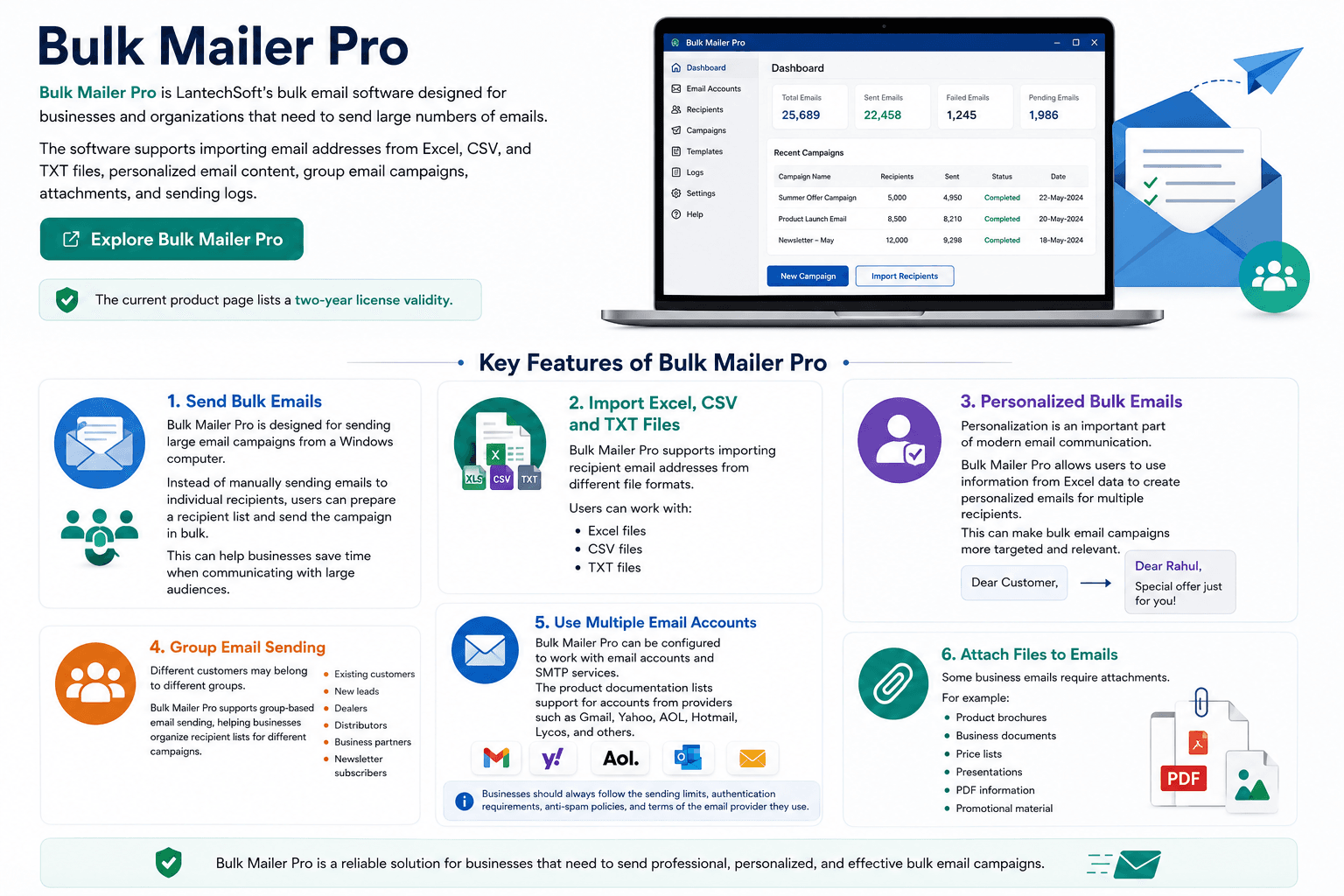
Bulk Mailer Pro is LantechSoft’s bulk email software designed for businesses and organizations that need to send large numbers of emails.
The software supports importing email addresses from Excel, CSV, and TXT files, personalized email content, group email campaigns, attachments, and sending logs.
The current product page lists a two-year license validity.
Key Features of Bulk Mailer Pro
Send Bulk Emails
Bulk Mailer Pro is designed for sending large email campaigns from a Windows computer.
Instead of manually sending emails to individual recipients, users can prepare a recipient list and send the campaign in bulk.
This can help businesses save time when communicating with large audiences.
Import Excel, CSV and TXT Files
Bulk Mailer Pro supports importing recipient email addresses from different file formats.
Users can work with:
- Excel files
- CSV files
- TXT files
This makes the software convenient for businesses that maintain their customer or prospect information in spreadsheets.
Personalized Bulk Emails
Personalization is an important part of modern email communication.
Bulk Mailer Pro allows users to use information from Excel data to create personalized emails for multiple recipients.
For example, instead of:
“Dear Customer,”
a campaign can use:
“Dear Rahul,”
and include additional recipient-specific information where appropriate.
This can make bulk email campaigns more targeted and relevant.
Group Email Sending
Different customers may belong to different groups.
For example:
- Existing customers
- New leads
- Dealers
- Distributors
- Business partners
- Newsletter subscribers
Bulk Mailer Pro supports group-based email sending, helping businesses organize recipient lists for different campaigns.
Use Multiple Email Accounts
Bulk Mailer Pro can be configured to work with email accounts and SMTP services.
The product documentation lists support for accounts from providers such as Gmail, Yahoo, AOL, Hotmail, Lycos, and others.
Businesses should always follow the sending limits, authentication requirements, anti-spam policies, and terms of the email provider they use.
Attach Files to Emails
Some business emails require attachments.
For example:
- Product brochures
- Business documents
- Price lists
- Presentations
- PDF information
- Promotional material
Bulk Mailer Pro supports adding attachments to email campaigns.
Email Sending Logs
Bulk email campaigns can involve hundreds or thousands of recipients.
Keeping records of campaign activity is therefore useful.
Bulk Mailer Pro provides log information for sent and failed emails.
This can help users review campaign results and identify unsuccessful sending attempts.
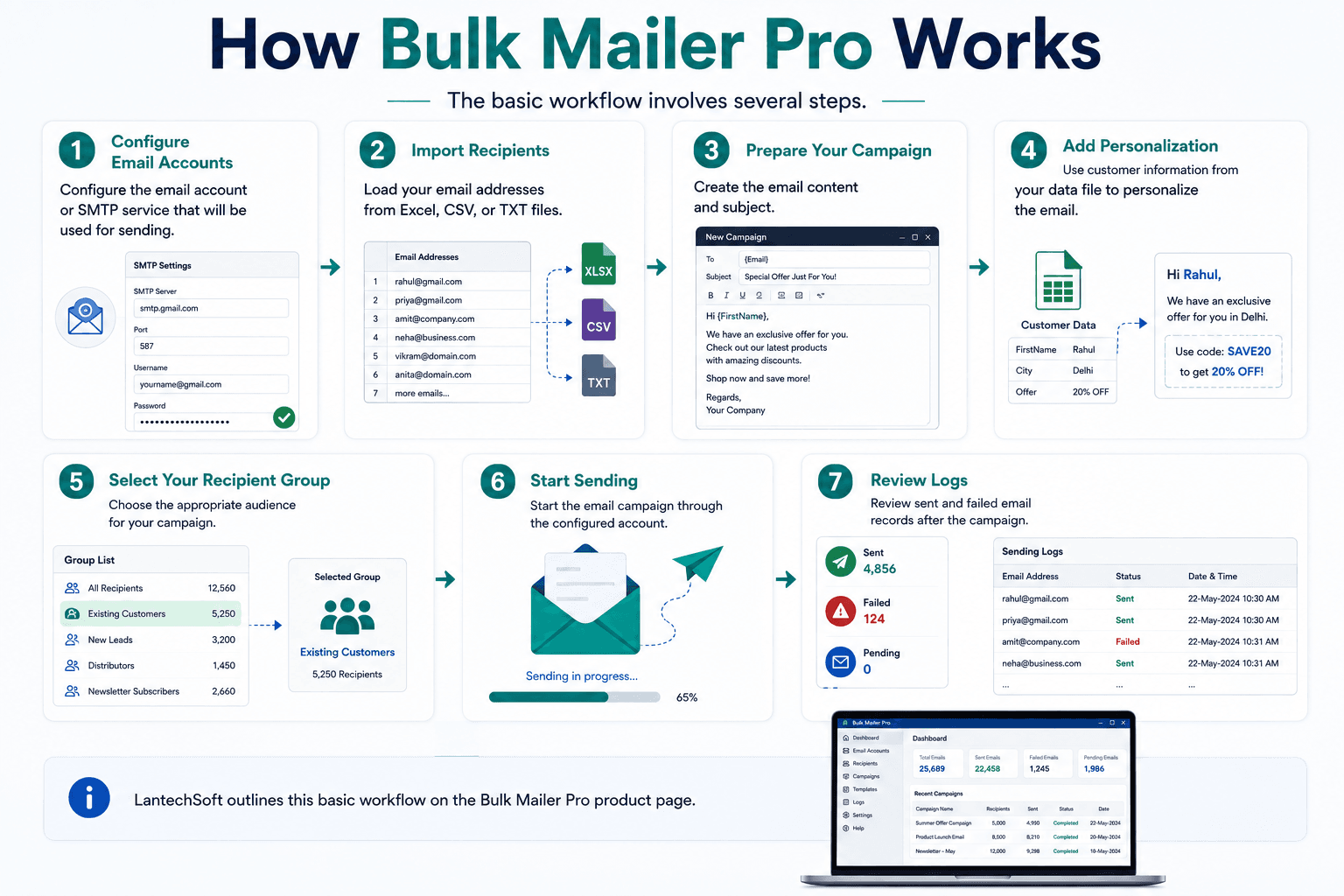
How Bulk Mailer Pro Works
The basic workflow involves several steps.
Step 1: Configure Email Accounts
Configure the email account or SMTP service that will be used for sending.
Step 2: Import Recipients
Load your email addresses from Excel, CSV, or TXT files.
Step 3: Prepare Your Campaign
Create the email content and subject.
Step 4: Add Personalization
Use customer information from your data file to personalize the email.
Step 5: Select Your Recipient Group
Choose the appropriate audience for your campaign.
Step 6: Start Sending
Start the email campaign through the configured account.
Step 7: Review Logs
Review sent and failed email records after the campaign.
LantechSoft outlines this basic workflow on the Bulk Mailer Pro product page.
Using SMS and Email Marketing Software Together
One of the biggest advantages of using SMS and Email Marketing Software is that businesses don’t have to depend on a single communication channel.
SMS and email can work together.
Consider a company launching a new service.
First Communication: Email
The company can send a detailed email explaining:
- The new service
- Features
- Benefits
- Pricing
- Images
- Contact information
- Website links
Second Communication: SMS
The business can then send a short SMS such as:
“Hi Rahul, our new service is now available. Visit our website to learn more.”
Follow-Up: Email
A second email can provide additional information or an offer.
This creates a structured communication journey.
Benefits of SMS and Email Marketing Software for Small Businesses
Small businesses often have limited marketing resources.
They may not have a large marketing department or dedicated communication team.
SMS and Email Marketing Software can help reduce repetitive manual work.
A small retailer, for example, could maintain customer information in Excel and use Android Bulk SMS Sender to communicate promotional offers.
The same business could use Bulk Mailer Pro for newsletters and detailed product announcements.
This allows a small team to manage both SMS and email communication without manually sending every message.
SMS and Email Marketing Software for Marketing Agencies
Marketing agencies often manage campaigns for multiple businesses.
A structured bulk communication workflow can help agencies organize:
- Client campaigns
- Recipient databases
- SMS lists
- Email lists
- Campaign content
- Sending records
Android Bulk SMS Sender can handle SMS communication through connected Android devices, while Bulk Mailer Pro can manage email campaigns through configured email accounts and SMTP services.
Agencies can therefore use different communication channels depending on their client’s campaign requirements.
SMS and Email Marketing Software for Sales Teams
Sales teams frequently need to communicate with leads and existing customers.
A typical sales communication workflow could involve:
Email: Send detailed product information.
SMS: Send a short follow-up.
Email: Provide additional information or pricing.
SMS: Send a reminder about an appointment or event.
The objective should not be to send as many messages as possible.
Instead, communication should be relevant, useful, and appropriately timed.
Personalization Makes Bulk Communication More Effective
Bulk communication does not have to mean generic communication.
A customer database may contain information such as:
- Name
- Company
- Location
- Product interest
- Customer type
- Order information
This information can be used to create more relevant campaigns.
For example:
Generic message:
“Special offer available now.”
Personalized message:
“Hi Rahul, enjoy our special offer available this week.”
Android Bulk SMS Sender supports personalized SMS using Excel data and custom fields, while Bulk Mailer Pro supports personalized email content using recipient data.
7 Powerful Ways Businesses Can Use SMS and Email Marketing Software
1. Product Promotions
Businesses can announce new products and special offers using both email and SMS.
2. Customer Notifications
SMS can be useful for short notifications, while email can provide more detailed information.
3. Event Marketing
Businesses can send event invitations through email and reminders through SMS.
4. Lead Follow-Up
Sales teams can combine email and SMS as part of a structured follow-up process.
5. Customer Engagement
Businesses can maintain regular communication with customers through newsletters, announcements, and relevant promotional messages.
6. Regional Marketing
Unicode SMS allows businesses to communicate with audiences using multiple languages.
7. Business Communication
Organizations can use bulk email and SMS tools for internal or external communication where appropriate.
Choosing the Right SMS and Email Marketing Software
The right software depends on your communication requirements.
Choose Android Bulk SMS Sender if:
- Your primary communication channel is SMS.
- You have Android smartphones available.
- You want to manage SMS from a Windows PC.
- You need to import mobile numbers.
- You need personalized SMS.
- You need multilingual SMS.
- You want to connect multiple Android phones.
- You want SMS sending logs.
Android Bulk SMS Sender supports these capabilities through connected Android devices.
Learn More About Android Bulk SMS Sender Unlimited
Choose Bulk Mailer Pro if:
- Email is your primary communication channel.
- You need to send bulk emails.
- You have recipient lists in Excel, CSV, or TXT.
- You need personalized emails.
- You need email groups.
- You need attachments.
- You want email sending logs.
- You want to work with configured email accounts or SMTP services.
These are among the capabilities listed by LantechSoft for Bulk Mailer Pro.
Learn More About Bulk Mailer Pro
Need Both?
If your business communicates with customers through both SMS and email, using both solutions can provide a broader communication workflow.
SMS and Email Marketing Best Practices
Having powerful software is only one part of successful communication.
Businesses should also follow responsible messaging practices.
Use Permission-Based Contact Lists
Only send marketing communications to recipients where you have the appropriate permission or lawful basis.
Don’t purchase random contact databases simply to increase the size of a campaign.
Send Relevant Content
Every message should have a purpose.
Ask:
Is this information useful to the recipient?
If the answer is no, reconsider sending the campaign.
Avoid Excessive Messaging
Sending too many SMS messages or emails can negatively affect customer relationships.
Create a reasonable communication schedule.
Personalize Your Campaigns
Use customer information where appropriate to make messages more relevant.
Keep Messages Clear
Recipients should understand:
- Who sent the message
- Why they received it
- What the communication is about
- What action they can take
Follow Email Provider Requirements
When sending bulk email, businesses should also follow the requirements of the email providers they use.
Google publishes sender guidance covering areas such as email authentication, spam rates, and sending practices. Businesses should review the latest official requirements before running large campaigns.
Google Email Sender Guidelines
Respect Local Regulations
Businesses should comply with applicable privacy, anti-spam, telecommunications, and electronic communication regulations in the countries where they operate and where their recipients are located.
Android Bulk SMS Sender vs Bulk Mailer Pro
Although both products are designed for bulk communication, they focus on different channels.
| Feature | Android Bulk SMS Sender | Bulk Mailer Pro |
|---|---|---|
| Primary channel | SMS | |
| Desktop management | Yes | Yes |
| Android phones | Yes | No |
| Multiple devices | Yes | N/A |
| Excel import | Yes | Yes |
| CSV/TXT import | Yes | Yes |
| Personalization | Yes | Yes |
| Unicode SMS | Yes | Email-dependent |
| Recipient groups | Lists/contacts | Yes |
| Sending logs | Yes | Yes |
| Scheduling | Yes | Campaign workflow |
| Attachments | SMS-dependent | Yes |
| Best use | SMS campaigns | Email campaigns |
The two tools address different communication requirements and can therefore complement each other.
Frequently Asked Questions
What is SMS and Email Marketing Software?
SMS and Email Marketing Software consists of tools designed to help businesses manage communication through SMS and email. These tools can simplify contact management, campaign preparation, personalization, and bulk sending.
What is Android Bulk SMS Sender?
Android Bulk SMS Sender is desktop software that allows users to send bulk SMS messages through one or multiple connected Android smartphones.
Can Android Bulk SMS Sender connect multiple phones?
Yes. LantechSoft states that multiple Android smartphones can be connected simultaneously.
Can I import contacts from Excel?
Yes. Android Bulk SMS Sender supports importing contact information from files, including Excel, while Bulk Mailer Pro supports importing email recipients from Excel, CSV, and TXT files.
Does Android Bulk SMS Sender support personalized SMS?
Yes. Users can use Excel data and custom fields to create personalized SMS messages for recipients.
Does Android Bulk SMS Sender support multiple languages?
Yes. The software supports Unicode SMS and languages including Hindi, Arabic, Bengali, Tamil, Telugu, Gujarati, Urdu, and others.
Can I schedule SMS campaigns?
Yes. Android Bulk SMS Sender supports scheduling SMS campaigns for future delivery.
What is Bulk Mailer Pro?
Bulk Mailer Pro is a desktop bulk email software solution from LantechSoft designed for sending large email campaigns through configured email accounts and SMTP services.
Can Bulk Mailer Pro import Excel files?
Yes. Bulk Mailer Pro supports importing email addresses from Excel, CSV, and TXT files.
Does Bulk Mailer Pro support personalized emails?
Yes. The software allows users to personalize email content using recipient data.
Can I send email campaigns to different groups?
Yes. Bulk Mailer Pro supports group email sending and recipient organization.
Does Bulk Mailer Pro provide sending logs?
Yes. The software provides logs containing information about sent and failed emails.
Why Choose LantechSoft for Bulk Communication Software?
Businesses have different communication requirements.
Some need a dedicated SMS solution that can work with Android smartphones.
Others need desktop software for managing large email campaigns.
Some businesses need both.
LantechSoft provides solutions for both communication channels.
Android Bulk SMS Sender Unlimited provides a way to manage bulk SMS through connected Android smartphones, with features such as contact imports, personalized messages, Unicode SMS, multiple-device support, scheduling, and message logs.
Bulk Mailer Pro provides a desktop solution for bulk email communication with features including recipient imports, personalized emails, email groups, attachments, and sending logs.
This makes the two products suitable for businesses looking to build a more flexible communication workflow.
Get Started with SMS and Email Marketing Software
Effective customer communication isn’t simply about sending more messages.
It is about reaching the right audience with useful information through the appropriate communication channel.
SMS and Email Marketing Software can help businesses reduce repetitive work, organize contact lists, personalize campaigns, and manage large-scale communication more efficiently.
For businesses focused on SMS communication, Android Bulk SMS Sender Unlimited provides desktop-based management of SMS campaigns through connected Android phones.
For businesses focused on email communication, Bulk Mailer Pro provides tools for managing recipient lists, personalized email campaigns, groups, attachments, and sending records.
Using both solutions can give businesses the flexibility to communicate with their audiences through SMS and email.
If your business regularly communicates with customers, leads, subscribers, students, clients, or business partners, choosing the right SMS and Email Marketing Software can make campaign management significantly more organized.
Explore LantechSoft’s Communication Software
Android Bulk SMS Sender Unlimited
Send bulk SMS through connected Android smartphones, import contact lists, personalize messages, use Unicode languages, schedule campaigns, and maintain SMS logs.
Manage bulk email campaigns using imported recipient lists, personalized messages, email groups, attachments, and campaign logs.
Choose the right channel, personalize your communication, and make your customer outreach more organized with LantechSoft’s SMS and email marketing solutions.
