
Introduction
SMS continues to be one of the most effective communication channels for businesses. Whether you’re announcing a new product, sending promotional offers, reminding customers about appointments, or sharing important updates, text messages offer unmatched speed and visibility. Unlike emails that may go unread or social media posts that can get lost in crowded feeds, SMS messages are typically delivered instantly and viewed within minutes.
However, sending hundreds or thousands of messages manually from a mobile phone is time-consuming and inefficient. Businesses need a reliable solution that simplifies mass messaging while keeping costs under control.
Android Bulk SMS Sender is a professional Windows-based software that enables businesses to send bulk SMS messages directly from one or more Android phones connected to a computer. Instead of depending on expensive SMS gateway services, you can use your existing Android devices and SIM cards to send personalized messages quickly, efficiently, and at a much lower cost.
What is Android Bulk SMS Sender?
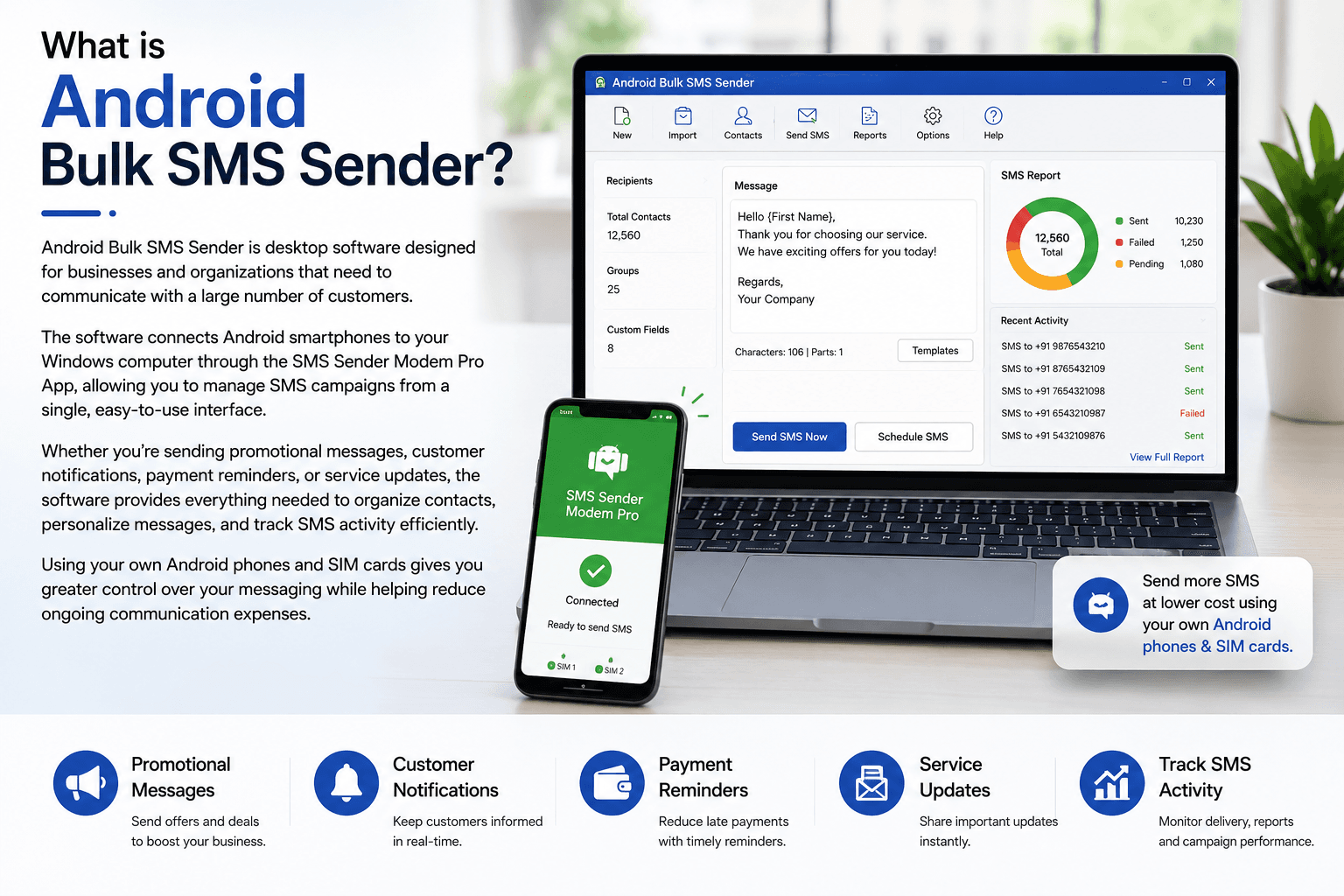
Android Bulk SMS Sender is desktop software designed for businesses and organizations that need to communicate with a large number of customers. The software connects Android smartphones to your Windows computer through the SMS Sender Modem Pro App, allowing you to manage SMS campaigns from a single, easy-to-use interface.
Whether you’re sending promotional messages, customer notifications, payment reminders, or service updates, the software provides everything needed to organize contacts, personalize messages, and track SMS activity efficiently.
Using your own Android phones and SIM cards gives you greater control over your messaging while helping reduce ongoing communication expenses.
Why SMS Marketing Still Works
Despite the popularity of messaging apps and email, SMS remains one of the most trusted communication methods for businesses.
Some of its biggest advantages include:
- Instant message delivery
- Excellent open and read rates
- Direct communication with customers
- No internet required for recipients
- Ideal for promotional campaigns
- Perfect for reminders and notifications
- Cost-effective marketing channel
- Suitable for businesses of every size
Whether you operate a retail store, educational institute, healthcare facility, real estate agency, or service business, SMS helps you connect with customers quickly and effectively.
Key Features of Android Bulk SMS Sender
Send Bulk SMS Directly from Your Computer
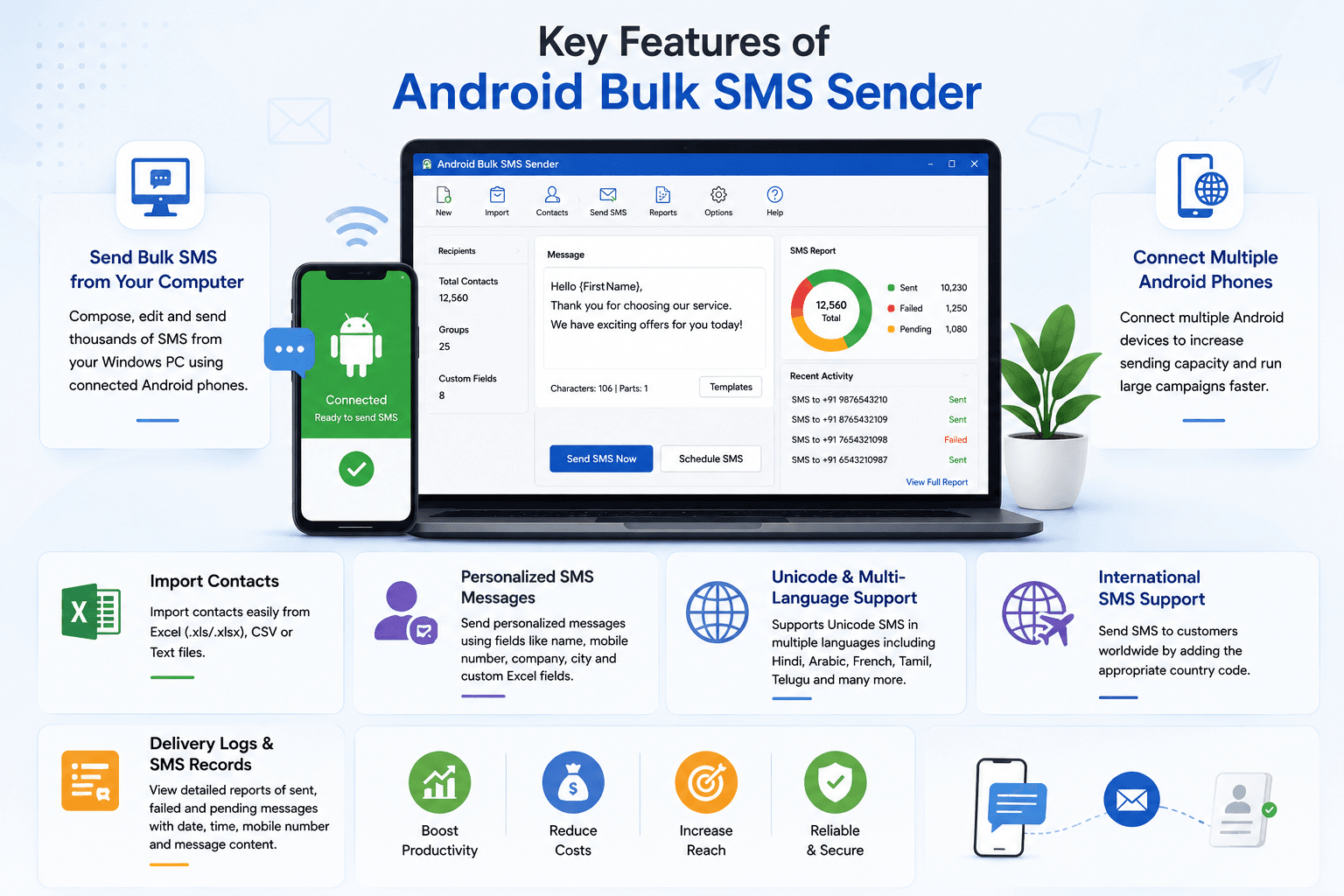
Managing SMS campaigns from a desktop computer is much easier than typing messages on a mobile phone. Android Bulk SMS Sender allows you to compose, edit, and send thousands of messages directly from your Windows PC while using connected Android phones to deliver the SMS.
This improves productivity and simplifies campaign management.
Connect Multiple Android Phones
Businesses that send a high volume of SMS can connect multiple Android devices simultaneously.
Using multiple phones increases sending capacity and helps distribute outgoing messages across different SIM cards, making large campaigns faster and more efficient.
Import Contacts from Excel, CSV, or Text Files
Entering thousands of phone numbers manually is not practical.
Android Bulk SMS Sender allows you to import recipient lists from:
- Microsoft Excel (.xls/.xlsx)
- CSV files
- Text files
This saves time and reduces manual data entry errors.
Send Personalized SMS Messages
Personalized communication increases customer engagement and improves response rates.
The software supports personalized SMS by automatically inserting information from your imported contact list.
For example, instead of sending:
Dear Customer, your appointment is tomorrow.
You can send:
Hello John, your appointment is scheduled for tomorrow at 10:00 AM.
Supported personalization fields include:
- Customer Name
- Mobile Number
- Company Name
- City
- Custom Excel Fields
This makes every message feel more personal and professional.
Unicode and Multi-Language Support
Businesses serving customers across different regions can communicate in their preferred language.
Android Bulk SMS Sender supports Unicode SMS, allowing messages to be sent in languages such as:
- Hindi
- Arabic
- French
- German
- Japanese
- Tamil
- Telugu
- Punjabi
- Bengali
- Gujarati
- Marathi
- Many more
This makes the software suitable for both domestic and international businesses.
International SMS Support
If your customers are located in different countries, Android Bulk SMS Sender makes international messaging simple.
By including the appropriate country code with each mobile number, businesses can send SMS campaigns to customers worldwide using supported mobile networks.
Delivery Logs and SMS Records
Tracking every SMS campaign is important for maintaining accurate communication records.
The software automatically stores information such as:
- Sent messages
- Failed messages
- Recipient mobile numbers
- Message content
- Date and time of transmission
These logs help businesses review campaign performance and maintain communication history.
Who Can Benefit from Android Bulk SMS Sender?
Android Bulk SMS Sender is suitable for organizations across many industries.
Educational Institutions
Schools, colleges, coaching centers, and universities can use the software to send:
- Admission notifications
- Attendance alerts
- Fee reminders
- Examination schedules
- Holiday announcements
- Parent notifications
Healthcare Providers
Hospitals, clinics, laboratories, and healthcare centers can send:
- Appointment reminders
- Prescription notifications
- Health awareness campaigns
- Vaccination reminders
- Patient follow-up messages
Retail Businesses
Retail stores and eCommerce businesses can promote:
- Seasonal discounts
- Festival offers
- New product launches
- Loyalty rewards
- Special promotions
- Clearance sales
Real Estate Companies
Real estate agencies and developers can communicate with potential buyers through:
- Property launch announcements
- Investment opportunities
- Site visit invitations
- Price updates
- Project information
Financial Services
Banks, insurance companies, and financial institutions can send:
- Payment reminders
- Policy renewal notices
- EMI alerts
- Customer notifications
- Service updates
Event Management Companies
Event organizers can notify attendees about:
- Event registrations
- Venue details
- Schedule updates
- Invitations
- Last-minute announcements
How Android Bulk SMS Sender Works
The software is designed to be simple and easy to use.
Step 1
Install the SMS Sender Modem Pro App on your Android smartphone.
Step 2
Connect your Android phone and Windows PC to the same local Wi-Fi network.
Step 3
Open the application and connect your phone using its displayed IP address.
Step 4
Import your contact list manually or from Excel, CSV, or Text files.
Step 5
Compose your SMS campaign.
Step 6
Send personalized or standard SMS messages directly through your connected Android device.
Within minutes, your campaign can reach hundreds or thousands of recipients.
Advantages of Using Android Bulk SMS Sender
Businesses choose Android Bulk SMS Sender because it offers numerous advantages:
- Easy desktop interface
- Fast bulk SMS delivery
- Lower messaging costs
- Personalized SMS campaigns
- Support for multiple Android devices
- Excel contact import
- Unicode messaging support
- International SMS capability
- Detailed delivery logs
- Reliable performance
- Improved customer communication
- Scalable for growing businesses
Why Choose Android Bulk SMS Sender?
Many businesses spend significant amounts on online SMS gateway services that charge on a per-message basis.
Android Bulk SMS Sender offers a more flexible and cost-effective alternative by allowing businesses to use their own Android devices and SIM cards.
Some reasons businesses prefer this software include:
- Greater control over SMS campaigns
- Reduced messaging costs
- Simple setup process
- Easy contact management
- Support for personalized messaging
- Suitable for businesses of all sizes
- Reliable desktop-based solution
- Professional campaign management
Whether you send a few hundred or several thousand messages every month, Android Bulk SMS Sender provides an efficient platform for managing SMS communication.
Best Practices for Effective SMS Campaigns
To maximize the success of your SMS marketing campaigns, consider these best practices:
- Keep messages short and easy to understand.
- Personalize messages whenever possible.
- Send only relevant information to your audience.
- Maintain an updated contact database.
- Avoid sending excessive promotional messages.
- Review delivery logs regularly.
- Test messages before launching large campaigns.
Following these practices helps improve customer engagement and increases campaign effectiveness.
Frequently Asked Questions (FAQs)
What is Android Bulk SMS Sender?
Android Bulk SMS Sender is Windows software that enables users to send bulk SMS messages using one or more Android phones connected to a computer.
Do I need an SMS gateway?
No. The software uses your own Android phones and SIM cards, eliminating the need for third-party SMS gateway services.
Can I connect multiple Android phones?
Yes. Multiple Android devices can be connected simultaneously to increase SMS sending capacity.
Can I import contacts from Excel?
Yes. Contacts can be imported from Excel, CSV, and Text files, making it easy to manage large contact databases.
Can I personalize every SMS?
Yes. The software supports mail merge functionality, allowing customer names, phone numbers, company names, and other fields to be inserted automatically into each message.
Does the software support multiple languages?
Yes. Unicode support allows messages to be sent in many regional and international languages, including Hindi, Arabic, French, German, Japanese, Tamil, Telugu, Punjabi, Bengali, Gujarati, and more.
Can I send international SMS?
Yes. Simply include the appropriate country code with recipient phone numbers to send international messages.
Does the software maintain SMS records?
Yes. Android Bulk SMS Sender automatically keeps records of sent messages, failed messages, recipient details, and message history for future reference.
Which businesses can use this software?
The software is ideal for educational institutions, healthcare providers, retailers, real estate companies, financial organizations, event managers, government departments, NGOs, marketing agencies, and many other businesses.
Conclusion
Fast and reliable customer communication is essential for every modern business, and SMS continues to be one of the most effective ways to achieve it. Android Bulk SMS Sender simplifies bulk messaging by allowing businesses to send thousands of SMS messages directly from a Windows computer using one or more Android phones.
With features such as multi-device support, Excel contact import, personalized messaging, Unicode compatibility, international SMS capability, and comprehensive delivery logs, the software provides a practical and cost-effective solution for organizations looking to improve customer engagement without relying on expensive third-party SMS gateways.
Whether you’re running promotional campaigns, sending customer updates, or managing business communications, Android Bulk SMS Sender offers the tools needed to deliver messages quickly, efficiently, and professionally.
