
Sending hundreds or thousands of SMS messages manually is time-consuming, difficult to manage, and not practical for modern businesses. Whether you are promoting a product, following up with leads, reminding customers about appointments, announcing an event, or communicating with subscribers, Android Bulk SMS Sender provides a convenient way to manage bulk SMS campaigns from your Windows PC.
Unlike a conventional web-based SMS platform, Android Bulk SMS Sender allows you to use connected Android smartphones and their SIM cards to send SMS from a centralized desktop application. You can import phone numbers from Excel or text files, create personalized messages, connect multiple Android phones, send multilingual SMS, schedule messages, and maintain records of sent and failed SMS.
The software is available in different configurations, including 1-phone, 2-phone, 4-phone, and higher-capacity versions, making it possible to select a setup based on your business requirements.
Whether you are a small business, marketing agency, retailer, educational organization, real estate company, healthcare provider, or enterprise, Android Bulk SMS Sender software can help simplify your SMS communication workflow.
What Is Android Bulk SMS Sender?
Android Bulk SMS Sender is desktop bulk SMS software that allows you to send SMS messages through one or multiple Android smartphones connected to a computer.
The basic concept is simple:
Windows PC → Android Phones → SIM Cards → SMS Recipients
The required SMS Sender Modem Pro application is installed on the Android phone. The phone is then connected to the desktop application through the supported local network setup. Once connected, you can manage recipients and SMS campaigns directly from your PC.
Instead of manually opening your phone’s messaging application and sending messages one at a time, you can prepare a recipient database, create your SMS campaign, personalize messages, select your connected Android phone or phones, and manage the sending process from one interface.
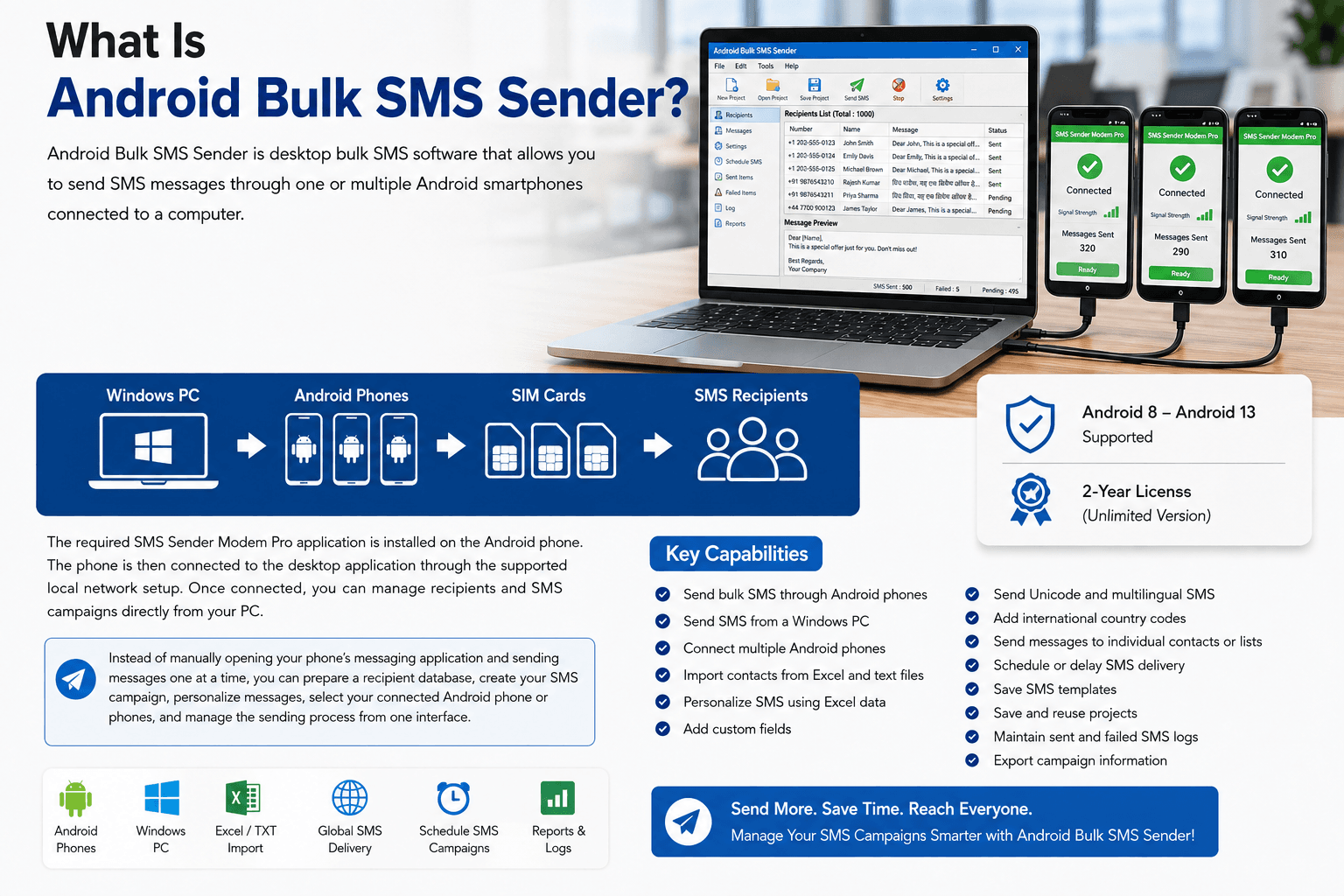
Key capabilities include:
- Send bulk SMS through Android phones
- Send SMS from a Windows PC
- Connect multiple Android phones
- Import contacts from Excel and text files
- Personalize SMS using Excel data
- Add custom fields
- Send Unicode and multilingual SMS
- Add international country codes
- Send messages to individual contacts or lists
- Schedule or delay SMS delivery
- Save SMS templates
- Save and reuse projects
- Maintain sent and failed SMS logs
- Export campaign information
The official product page currently lists support for Android 8 through Android 13 and a two-year license for the Unlimited version.
Why Businesses Still Use SMS Marketing
Digital marketing has expanded dramatically, but SMS remains an important customer communication channel.
An email can remain unread.
A social media post may not reach every follower.
An app notification requires an installed application.
SMS provides a direct mobile communication channel that can be particularly useful for short, time-sensitive messages.
Businesses can use SMS for:
- Promotional offers
- Customer notifications
- Appointment reminders
- Event invitations
- Lead follow-ups
- Payment reminders
- Product announcements
- Service updates
- Educational notifications
- Membership reminders
- Local marketing campaigns
For example:
Hi John, your exclusive 25% discount is available until Friday. Visit our store today to claim your offer.
With personalization, the same campaign can automatically use different customer information for different recipients.
That is where bulk SMS software becomes more useful than manually sending messages.
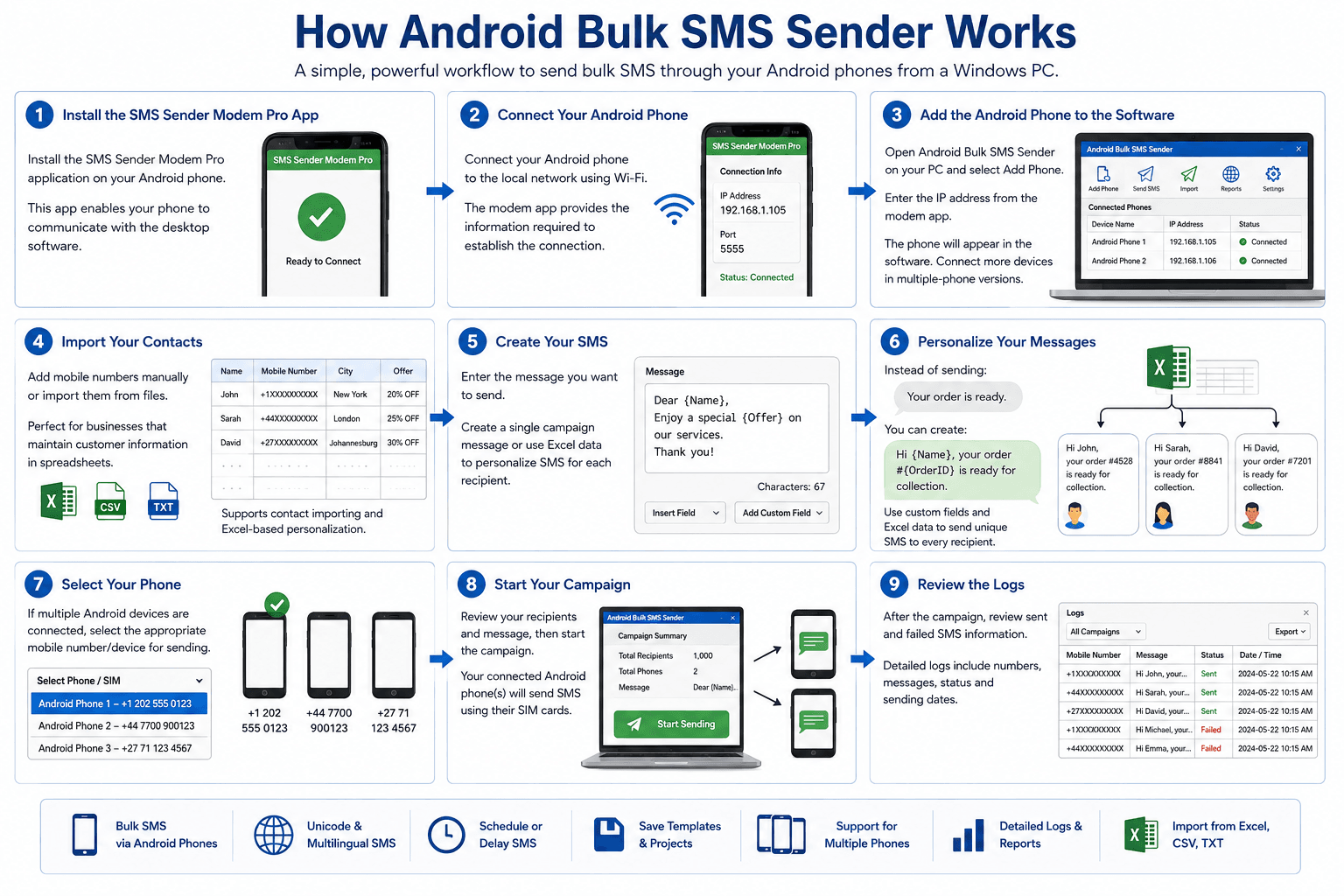
How Android Bulk SMS Sender Works
The Android Bulk SMS Sender workflow is designed around a PC and connected Android devices.
Step 1: Install the SMS Sender Modem Pro App
The first step is to install the required SMS Sender Modem Pro application on the Android phone.
This application enables the Android phone to communicate with the desktop software.
Step 2: Connect Your Android Phone
Connect your Android phone to the local network using Wi-Fi.
The modem application provides the information required to establish the connection between your Android device and computer.
Step 3: Add the Android Phone to the Software
Open Android Bulk SMS Sender on your PC and select the option to add an Android phone.
Enter the IP address displayed by the modem application.
Once successfully connected, the Android phone will appear in the software.
If you are using a multiple-phone version, additional supported Android devices can also be connected.
Step 4: Import Your Contacts
You can add mobile numbers manually or import them from files.
This is especially useful for businesses that already maintain customer information in spreadsheets.
For example:
| Name | Mobile Number | City | Offer |
|---|---|---|---|
| John | +1XXXXXXXXXX | New York | 20% OFF |
| Sarah | +44XXXXXXXXXX | London | 25% OFF |
| David | +27XXXXXXXXXX | Johannesburg | 30% OFF |
The software supports contact importing and Excel-based personalization.
Step 5: Create Your SMS
Enter the message you want to send.
You can create a single campaign message or use Excel data to generate personalized SMS messages for individual recipients.
Step 6: Personalize Your Messages
Instead of sending:
Your order is ready.
You can create:
Hi John, your order #4528 is ready for collection.
Custom fields and Excel information can be used to create unique SMS messages for recipients.
Step 7: Select Your Phone
If multiple Android devices are connected, you can select the appropriate mobile number/device for sending.
Step 8: Start Your Campaign
After checking your recipient list and message, start the campaign.
Your connected Android phone or phones will handle the SMS transmission using their SIM connections.
Step 9: Review the Logs
After the campaign, you can review sent and failed SMS information.
The software maintains detailed logs containing campaign activity, including the numbers, messages, and sending dates.
Android Bulk SMS Sender Features
One of the main advantages of Android Bulk SMS Sender software is that it combines several useful SMS campaign functions into one desktop application.
Bulk SMS From Your PC
You don’t have to manually operate every Android phone for every recipient.
The software provides a centralized interface for managing your SMS campaigns from a Windows computer.
This can make large contact lists much easier to handle.
Excel Contact Import
Many businesses already store customer information in Excel.
Instead of manually copying thousands of phone numbers, you can import your contact database into the software.
This can save considerable preparation time when running recurring campaigns.
Personalized Bulk SMS
Bulk messaging doesn’t have to mean sending exactly the same message to every recipient.
Using Excel information and custom fields, you can create personalized messages.
For example:
Generic SMS
Get 30% OFF this weekend. Shop now.
Personalized SMS
Hi Sarah, enjoy your exclusive 30% OFF weekend offer. Shop now.
Personalized messaging can make promotional campaigns feel more relevant and customer-focused.
Send SMS in Multiple Languages
International businesses often need to communicate with customers in their preferred languages.
Android Bulk SMS Sender supports Unicode SMS, allowing messages to be created in multiple languages. The official product information mentions support for languages including Hindi, Arabic, Bengali, Tamil, Telugu, Gujarati, Urdu, French, Italian, Japanese, and others.
This makes the software useful for businesses serving multilingual audiences.
For example:
- A European company can communicate with customers in French, German, Italian, or other supported languages.
- A business serving African markets can create localized campaigns.
- An international retailer can prepare different campaigns for different customer groups.
- An organization in the Middle East can use Arabic SMS.
Unicode support is particularly useful when the campaign requires characters that are not available in standard English SMS text.
Send International Bulk SMS
Businesses increasingly communicate with customers across borders.
Android Bulk SMS Sender supports international SMS by allowing country codes to be added as prefixes to mobile numbers.
This can be useful for businesses targeting customers in markets such as:
- United States
- United Kingdom
- Canada
- Germany
- France
- Italy
- Spain
- Netherlands
- South Africa
- Nigeria
- Kenya
- Ghana
- Egypt
- Morocco
- And other international markets
However, international SMS availability and pricing depend on the SIM card, mobile operator, network, and SMS plan being used.
Android Bulk SMS Sender for Businesses in Different Markets
The software can be adapted to many business communication scenarios.
Bulk SMS Marketing in the USA
US businesses can use bulk SMS for:
- Promotional campaigns
- Customer notifications
- Appointment reminders
- Lead follow-ups
- Retail offers
- Event marketing
- Service notifications
For example, a local business can maintain a customer list in Excel and create a personalized promotional campaign.
Businesses sending commercial SMS in the US should ensure that campaigns comply with applicable laws, carrier requirements, consent rules, and opt-out requirements.
Bulk SMS Marketing in the UK
UK businesses can use Android Bulk SMS Sender for:
- Retail promotions
- Real estate leads
- Appointment reminders
- Event notifications
- Customer service
- Local marketing
- Education communication
A property agency, for example, could maintain separate lists for buyers, sellers, landlords, and tenants.
This allows the agency to create more targeted campaigns instead of sending the same message to every contact.
UK businesses should also ensure their SMS campaigns comply with applicable privacy and electronic marketing requirements.
Bulk SMS Marketing in Europe
European businesses often need to communicate across different countries and languages.
Unicode support makes it possible to prepare multilingual SMS campaigns.
A company could maintain separate customer segments for:
- Germany
- France
- Spain
- Italy
- Belgium
- Netherlands
- Austria
- Poland
- Sweden
- Ireland
Instead of sending one generic message, businesses can create localized campaigns for different audiences.
Organizations should ensure that their contact databases and commercial SMS campaigns comply with applicable privacy and electronic communications requirements.
Bulk SMS Marketing in African Markets
SMS can also be useful for businesses serving customers across African markets.
Potential use cases include:
- Retail promotions
- Healthcare reminders
- Education notifications
- Financial service communication
- Logistics updates
- Event announcements
- Real estate marketing
- Travel services
- Customer notifications
Businesses operating across multiple African countries can organize recipient lists using international country codes and create multilingual SMS campaigns where appropriate.
Actual sending capability depends on the Android phone, SIM card, mobile operator, network, and SMS plan.
Android Bulk SMS Sender Variants
Different businesses have different SMS requirements.
A small business may only need one Android phone.
A growing marketing team may want two or four phones.
A larger operation may need a higher-capacity configuration.
Android Bulk SMS Sender is available in multiple versions to accommodate these requirements.
Android Bulk SMS Sender – 1 Phone
The 1 Phone version is designed for users who need to operate bulk SMS campaigns through a single Android phone.
It can be suitable for:
- Small businesses
- Freelancers
- Local retailers
- Consultants
- Startups
- Individual marketers
This can be a good starting point if you don’t need multiple Android devices.
Explore the 1 Phone version:
Android Bulk SMS Sender – 1 Phone
Android Bulk SMS Sender – 2 Phones
The 2 Phone version is designed for businesses that want to connect two Android phones.
It can be useful when:
- Your SMS campaigns are growing
- You have two SIM cards
- You want additional device capacity
- You manage regular campaigns
- One Android phone is not enough for your workflow
Explore the 2 Phone version:
Android Bulk SMS Sender – 2 Phones
Android Bulk SMS Sender – 4 Phones
The 4 Phone version provides support for four Android phones.
It may be suitable for:
- Marketing agencies
- Medium-sized businesses
- Educational organizations
- Event companies
- Real estate businesses
- Customer communication teams
Using multiple devices allows businesses to build a larger SMS operation while still managing campaigns from the same desktop application.
Explore the 4 Phone version:
Android Bulk SMS Sender – 4 Phones
Android Bulk SMS Sender – Unlimited
For businesses that require a higher-capacity setup, the Android Bulk SMS Sender Unlimited version provides support for multiple Android phones.
The official product page currently lists the Unlimited version at $120 with a 2-year license and Android 8 through Android 13 support.
It is designed for businesses that want to operate a larger multi-device SMS workflow.
Explore Android Bulk SMS Sender Unlimited:
Android Bulk SMS Sender Unlimited
Important: “Unlimited” refers to the product’s phone-support configuration. It does not mean unlimited SMS independent of SIM plans, mobile operators, network conditions, or carrier restrictions.
Which Android Bulk SMS Sender Version Should You Choose?
Choosing the right version depends on how many Android phones you want to use.
| Version | Phone Support | Suitable For |
|---|---|---|
| 1 Phone | 1 | Small businesses & individuals |
| 2 Phones | 2 | Growing businesses |
| 4 Phones | 4 | Marketing teams & larger campaigns |
| Unlimited | Multiple | Larger SMS operations |
If you’re just getting started, the 1-phone version may be sufficient.
If you need more device capacity, consider the 2-phone or 4-phone versions.
If you’re building a larger SMS operation, the Unlimited version may be the better fit.
Bulk SMS Personalization With Excel
Personalization is one of the most useful features for modern SMS marketing.
Suppose your Excel file contains:
| Name | Product | Discount |
|---|---|---|
| John | Laptop | 20% |
| Sarah | Smartphone | 25% |
| David | Tablet | 30% |
Instead of sending one generic message, you can create messages using the information in your spreadsheet.
John receives:
Hi John, get 20% OFF your selected Laptop today.
Sarah receives:
Hi Sarah, get 25% OFF your selected Smartphone today.
David receives:
Hi David, get 30% OFF your selected Tablet today.
This approach allows a single bulk SMS campaign to contain personalized information for individual recipients.
The software supports unique or personalized SMS using Excel data and custom fields.
Use SMS Templates for Recurring Campaigns
If your business sends similar messages regularly, templates can save time.
You can prepare templates for:
Promotional SMS
Hi [Name], enjoy [Discount] OFF this week. Visit us today.
Appointment Reminder
Hi [Name], your appointment is scheduled for [Date] at [Time].
Event Reminder
Hi [Name], your event is tomorrow at [Time]. We look forward to seeing you.
Customer Notification
Hi [Name], your request has been successfully processed.
Instead of creating the message from scratch every time, reusable templates can help standardize recurring campaigns.
Manage Your SMS Campaigns From One Place
Managing SMS manually across multiple phones can quickly become confusing.
Which customers were contacted?
Which phone sent the message?
Which messages failed?
When was the campaign sent?
What message was used?
Android Bulk SMS Sender provides a centralized desktop workflow that can make these tasks easier to manage.
The software maintains logs of sent and failed SMS and provides information such as recipient numbers, messages, and sending dates.
This can be useful for businesses that need to maintain campaign records.
Who Can Use Android Bulk SMS Sender?
The software can be used across many industries.
Retail Businesses
Send:
- Discounts
- Sales announcements
- New product alerts
- Seasonal offers
- Customer notifications
E-Commerce Businesses
Send:
- Order updates
- Promotional campaigns
- Customer follow-ups
- Special offers
Real Estate Agencies
Send:
- New property announcements
- Viewing reminders
- Lead follow-ups
- Open-house invitations
Schools and Colleges
Send:
- Examination announcements
- Fee reminders
- Event information
- Parent notifications
Healthcare Businesses
Send:
- Appointment reminders
- Schedule notifications
- Customer communication
Hotels and Restaurants
Send:
- Booking reminders
- Promotional offers
- Special event announcements
Marketing Agencies
Manage SMS campaigns for different clients and customer segments.
Event Organizers
Send:
- Registration messages
- Event reminders
- Venue updates
- Schedule changes
Android Bulk SMS Sender vs. Manual SMS Sending
Why use bulk SMS software instead of manually sending messages?
| Manual SMS | Android Bulk SMS Sender |
|---|---|
| Enter numbers manually | Import contact lists |
| Send messages individually | Manage bulk campaigns |
| Limited personalization | Excel-based personalization |
| Difficult to track campaigns | Sent/failed logs |
| Time-consuming | Centralized workflow |
| Limited scalability | Multiple-phone options |
| Repetitive work | Reusable templates/projects |
The biggest benefit isn’t simply sending more SMS.
It is reducing repetitive work and creating a structured SMS campaign workflow.
How to Create a Better Bulk SMS Campaign
Having bulk SMS software is only one part of successful SMS marketing.
Follow a structured process.
1. Organize Your Contact List
Keep your customer data clean and organized.
2. Remove Invalid Numbers
Review your database before starting a campaign.
3. Segment Your Audience
Group customers based on relevant criteria such as location, product interest, language, or customer type.
4. Write a Short Message
SMS works best when the message is direct and easy to understand.
5. Personalize Where Appropriate
Use names or relevant information to make messages more useful.
6. Include a Clear Call to Action
Tell customers what they should do next.
Examples:
- Shop Now
- Book Today
- Call Us
- Register Now
- Visit Our Website
7. Test Before Sending
Send a small test campaign before launching a large campaign.
8. Review Campaign Results
Check your sent and failed logs after sending.
9. Respect Customer Preferences
Only message people you are permitted to contact and honor applicable opt-out requests.
Is Android Bulk SMS Sender Right for You?
Android Bulk SMS Sender can be a good choice if your business:
- Uses Android smartphones
- Has SIM-based SMS plans
- Wants to send bulk SMS from a PC
- Maintains contacts in Excel or CSV
- Needs personalized SMS
- Sends multilingual messages
- Needs multiple Android phones
- Wants to manage SMS campaigns centrally
- Needs campaign logs
It may not be the best fit if you specifically need a completely cloud-hosted SMS API or carrier-grade messaging infrastructure without physical Android phones.
The right choice depends on your business model, SMS volume, target countries, carrier requirements, and technical setup.
Frequently Asked Questions About Android Bulk SMS Sender
What is Android Bulk SMS Sender?
Android Bulk SMS Sender is desktop software that allows users to send bulk SMS messages through connected Android smartphones. It supports contact importing, personalized messages, multiple devices, international numbers, Unicode SMS, and message logs.
Can I send bulk SMS from my computer?
Yes. Android Bulk SMS Sender is designed to let you manage SMS campaigns from a Windows PC while connected Android phones handle the SMS sending.
Can I connect multiple Android phones?
Yes. Multiple Android phones can be connected, depending on the version of Android Bulk SMS Sender you purchase.
Can I import phone numbers from Excel?
Yes. The software supports importing contact information from computer files, including Excel and text formats.
Can I personalize bulk SMS?
Yes. You can use Excel data and custom fields to create personalized messages for individual recipients.
Can I send SMS in different languages?
Yes. Android Bulk SMS Sender supports Unicode messaging for multiple languages.
Can I send international SMS?
Yes. International numbers can be supported by adding appropriate country codes to recipient numbers. Actual availability depends on your mobile operator and SIM plan.
Does Android Bulk SMS Sender require a SIM card?
Yes. The software is designed to send SMS through Android phones, so the phone needs a suitable SIM/mobile service for sending messages.
Do I need the SMS Sender Modem Pro App?
Yes. The official product documentation states that the SMS Sender Modem Pro App is required to establish the connection between the Android phone and the desktop software.
Can I schedule bulk SMS?
Yes. The current product information states that users can schedule campaigns for delivery at a future date and time.
Can I save SMS templates?
Yes. Reusable SMS content can be saved as templates for future campaigns.
Can I track sent and failed messages?
Yes. The software maintains logs of sent and failed SMS, including campaign-related information.
Can small businesses use Android Bulk SMS Sender?
Yes. The software is suitable for individuals, startups, small businesses, medium-sized organizations, and larger enterprises.
Is Android Bulk SMS Sender suitable for marketing?
Yes. It can be used for promotional campaigns, customer engagement, lead follow-ups, announcements, and other permission-based business communication.
How many SMS messages can I send?
There is no single universal number. Practical sending capacity depends on the number of connected Android devices, SIM plans, mobile operators, network conditions, and campaign configuration.
What is the difference between the 1-phone and 4-phone versions?
The primary difference is the number of Android phones supported. The 1-phone version is intended for a smaller setup, while the 4-phone version is designed for businesses that need multiple Android devices.
What does Android Bulk SMS Sender Unlimited mean?
The Unlimited version is the higher-capacity multi-phone configuration. It does not mean unlimited SMS independent of your SIM card, mobile operator, network, or SMS plan.
Final Thoughts
SMS remains one of the most practical channels for direct customer communication, particularly when messages need to be short, timely, and actionable.
Android Bulk SMS Sender provides a different approach to bulk SMS by allowing businesses to use Android smartphones and SIM cards while managing campaigns from a Windows PC.
Its combination of bulk SMS sending, Excel contact import, personalized messaging, multiple Android phone support, Unicode SMS, international number support, scheduling, templates, and campaign logs makes it a versatile option for businesses that want more control over their SMS workflow.
The different phone-support options also make it easier to select a setup according to your requirements.
Start With One Phone
Android Bulk SMS Sender – 1 Phone
Scale to Two Phones
Android Bulk SMS Sender – 2 Phones
Manage Four Phones
Android Bulk SMS Sender – 4 Phones
Build a Larger Multi-Phone Setup
Android Bulk SMS Sender Unlimited
Whether you are running a retail business, marketing agency, school, healthcare organization, real estate company, e-commerce store, or service business, choosing the right Android Bulk SMS Sender configuration can help you turn repetitive SMS tasks into a more organized and manageable communication process.
The goal isn’t simply to send bulk SMS. The goal is to make every SMS campaign easier to prepare, personalize, manage, and track.
