
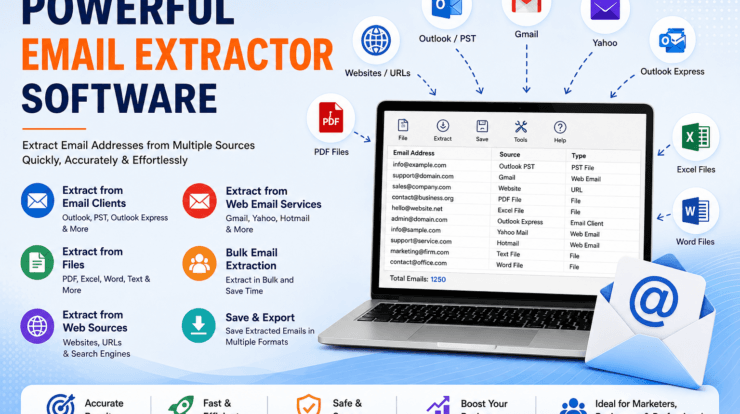
This is where email extractor software becomes useful.
Instead of searching through individual messages, files, or websites one at a time, specialized email extraction tools can scan supported sources and collect the email addresses you need.
LantechSoft Email Extractor Tools offers a range of specialized products for different email extraction requirements, including tools for Outlook, Gmail, Yahoo, Hotmail, documents, websites, URLs, and web-based sources.
What Is Email Extractor Software?
Email extractor software is a tool designed to automatically search a supported source and identify email addresses. Depending on the software, the source may be an email account, mailbox file, document, website, or collection of URLs.
Common sources include:
- Microsoft Outlook
- PST files
- Outlook Express DBX files
- Gmail
- Yahoo Mail
- Hotmail
- Word documents
- Excel spreadsheets
- PDF files
- Text files
- HTML files
- Websites
- Lists of URLs
Once the software identifies email addresses, the information can be collected into a separate list for easier review and organization.
This becomes particularly valuable when the information is spread across hundreds or thousands of messages or files.
Why Use an Email Extractor Instead of Doing It Manually?
There is nothing wrong with manually copying an email address when you need one or two contacts. The problem starts when you need hundreds or thousands of addresses.
Manual extraction can create several problems:
It Takes Time
Opening documents and emails individually is slow, especially when information is distributed across multiple folders or files.
It Is Repetitive
The process often becomes the same sequence over and over again: open, search, copy, paste, and repeat.
Duplicate Addresses Are Common
The same contact can appear in multiple emails, documents, or websites. Without proper filtering, your final list may contain the same address many times.
Important Addresses Can Be Missed
When people manually work through large collections of messages and files, it is easy to overlook information.
Large Datasets Become Difficult to Manage
A manual approach that works for ten addresses may become impractical when the source contains thousands of emails or documents.
Different Types of Email Extraction
One of the biggest mistakes people make when searching for an email extractor is assuming that every tool performs the same job. Different extraction tools are designed for different sources.
Extracting Email Addresses from Outlook
If your addresses are stored inside Outlook emails or PST files, an Outlook-focused extractor is usually the most appropriate choice.
Extracting Addresses from Documents
If your information is stored inside Word, Excel, PDF, TXT, HTML, or other supported documents, a file-based email extractor is more suitable.
Extracting Email Addresses from Websites
If you are working with publicly available business websites or a list of URLs, a web email extractor can search web pages for available email addresses.
Extracting Addresses from Gmail, Yahoo or Hotmail
If your contact information is stored inside a webmail account, a dedicated account-specific email extractor may be more convenient.
LantechSoft Email Extractor Tools
LantechSoft provides several specialized email extraction utilities for different sources and requirements. The current product category includes dedicated tools for Gmail, Yahoo, Hotmail, Outlook, Outlook Express, documents, URLs, websites and other data extraction tasks.
1. Outlook Email Extractor
Best for: Extracting email addresses from Microsoft Outlook and PST files.
Outlook is widely used by businesses and professionals, and old Outlook mailboxes can contain years of valuable contact information.
Outlook Email Extractor is designed to extract email addresses from Microsoft Outlook and Microsoft Outlook PST files.
The software can work with personal folders and subfolders such as Inbox, Drafts, Deleted Items, Sent Items, Outbox and Contacts. It also allows users to add multiple PST files for extraction.
This makes it useful for people who need to recover or organize contact information from historical Outlook mailboxes.
Good for:
- Outlook users
- PST archives
- Business email archives
- Contact recovery
- Historical email analysis
- Large Outlook mailboxes
If Outlook is your primary source of email data, this is one of the most relevant products to consider.
2. Outlook N Express Email Extractor
Best for: Extracting email addresses from Outlook PST and Outlook Express DBX files.
Some users still have older Outlook Express archives stored in DBX format. These older mailbox files can be difficult to manage with modern email applications.
Outlook N Express Email Extractor supports Microsoft Outlook PST files as well as Outlook Express DBX files.
The software is designed to extract email addresses from personal folders and subfolders such as Inbox, Outbox, Sent Items, Drafts, Tasks and Journal.
This can be especially useful when working with older email archives that have been stored for years.
3. Email Extractor Files
Best for: Extracting email addresses from documents and files.
Not every email address is stored inside an email application. Contact information is often found inside business documents, reports, spreadsheets and other files.
Email Extractor Files is designed to extract email addresses from supported document files.
The supported formats listed by LantechSoft include:
- DOC
- DOCX
- DOT
- XLS
- XLSX
- TXT
- RTF
- PPT
- PPTX
- XML
- HTML
- ASP
- PHP
Imagine having hundreds of PDF reports, Word documents and Excel spreadsheets containing contact information. Opening every file and searching manually could take hours.
A file-based email extractor provides a much more practical way to search a large collection of supported documents.
Useful for:
- Business documents
- PDF archives
- Excel spreadsheets
- Word documents
- Research files
- Historical records
4. Email Extractor URL
Best for: Extracting email addresses from websites and URLs.
The internet contains a large amount of publicly available business contact information. Finding it manually across many websites, however, can become time-consuming.
Email Extractor URL is designed to extract email addresses from websites and URLs.
The tool provides different searching options for web-based extraction and automatically removes duplicate email addresses according to the product information.
This can be useful when you have a list of websites and need to locate publicly displayed contact information without manually opening every page.
Publicly visible email addresses should still be handled responsibly. Extracting an address does not automatically give permission to send unsolicited marketing messages. Always follow applicable privacy, data-protection and anti-spam requirements.
5. Web Email Extractor Professional
Best for: Searching the web and extracting email addresses from websites.
Web Email Extractor Professional is designed for web-based email extraction.
The product information states that it can extract email addresses from the internet through popular search engines and can also extract addresses from a list of websites or URLs.
This makes it different from an Outlook or document extractor because its focus is web-based sources.
It can be useful for legitimate research, business intelligence, directory projects and other situations where publicly available website information needs to be collected and organized.
6. Gmail Email Address Extractor
Best for: Extracting email addresses from Gmail.
Gmail users can accumulate years of conversations containing thousands of email addresses. Many of those contacts may never have been saved separately in a contact list.
Gmail Email Address Extractor is designed to help users extract email IDs from Gmail in bulk.
This can be useful for organizing historical communication data, recovering contact information and managing large collections of email addresses.
Instead of opening conversations one by one, specialized extraction software can automate much of the repetitive searching involved in collecting addresses.
7. Yahoo Email Address Extractor
Best for: Extracting email addresses from Yahoo Mail.
LantechSoft also provides a dedicated Yahoo Email Address Extractor.
The software is designed to harvest email IDs from Yahoo accounts in bulk, making it an option for users who need to collect contact information from Yahoo Mail without manually checking messages one at a time.
8. Hotmail Email Address Extractor
Best for: Extracting email addresses from Hotmail accounts.
Hotmail Email Address Extractor is designed to extract email IDs from Hotmail accounts.
If historical contacts are stored inside a Hotmail mailbox, dedicated extraction software can provide a more convenient way to collect those addresses in bulk.
9. Gmail Attachment Extractor
Not every person searching for an email extractor is actually looking for email addresses.
Sometimes the real requirement is to recover files attached to emails.
Gmail Attachment Extractor is designed specifically for extracting attachments from Gmail messages.
According to the product information, it can extract attachments from areas such as Inbox, sent emails, drafts and spam.
It can be useful when an old Gmail account contains years of:
- Invoices
- Reports
- Images
- Presentations
- Documents
- Business files
Instead of downloading attachments manually from individual messages, a dedicated attachment extraction tool can simplify the process.
Email Extractor Software vs Manual Copy and Paste
The difference between automated extraction and manual work becomes increasingly obvious as the amount of data grows.
| Manual Extraction | Email Extractor Software |
|---|---|
| Open files individually | Process supported sources systematically |
| Copy addresses manually | Extract addresses automatically |
| Time-consuming for large collections | Designed for bulk extraction |
| Easy to miss information | Designed for systematic searching |
| Duplicate cleanup is manual | Some tools provide duplicate handling |
| Difficult to manage many files | Better suited to larger datasets |
| Highly repetitive | More automated workflow |
How to Choose the Right Email Extractor
Choosing the right tool becomes much easier if you first identify where your email addresses are stored.
Where Are Your Email Addresses Stored?
If they are in Outlook, choose an Outlook extractor. If they are in Word, Excel or PDF files, choose a file extractor. If they are on websites, use a URL or web extractor.
How Much Data Do You Have?
If you need only a few addresses, manual extraction may be enough. If you need thousands of addresses from hundreds of files or messages, automation can save significant time.
Do You Need Duplicate Removal?
Duplicate addresses are common when working with large email collections. Some extraction tools provide duplicate filtering to help produce a cleaner result.
Do You Need Email Addresses or Attachments?
These are two separate requirements. If you need contact information, choose an email address extractor. If you need documents attached to emails, choose an attachment extractor.
Email Extraction for Business Contact Management
Businesses accumulate contact information constantly.
A customer sends an email. A supplier replies. A partner joins a project. A salesperson communicates with a prospect. Over time, these conversations become a valuable source of historical contact information.
The problem is that email applications are primarily designed for communication, not necessarily for turning years of conversations into a clean contact database.
Email extraction software can help bridge that gap by turning scattered contact information into a more manageable list.
A typical workflow might look like:
Email archives → Extract addresses → Review → Remove duplicates → Organize → Use appropriately
Email Extraction for Research
Researchers often work with large collections of documents and web pages.
These may include:
- Reports
- PDFs
- Research papers
- Company documents
- Web pages
- Directories
- Spreadsheets
Some of these resources may contain contact information that is relevant to a legitimate research project.
Instead of manually searching every document or website, a file or web email extractor can speed up the initial discovery process.
As always, extracted information should be handled responsibly and in accordance with applicable privacy and communication regulations.
Email Extraction for Old Data
One of the most overlooked uses for email extraction software is working with old data.
Many users and organizations still have:
- Old PST files
- Archived Outlook folders
- Previous computer backups
- Old business documents
- Historical Gmail messages
- Older Yahoo accounts
- Old Hotmail accounts
These archives may contain contact information that is no longer available in current systems.
Instead of leaving that information buried in old archives, an appropriate extractor can help recover and organize useful data.
Building a More Organized Email Data Workflow
If you regularly work with large amounts of email data, it helps to think about extraction as a process rather than a single action.
Step 1: Identify the Source
Determine whether your information is stored in Outlook, PST, DBX, Gmail, Yahoo, Hotmail, documents, websites or URLs.
Step 2: Select the Appropriate Extractor
Choose software that matches your source and the type of data you need.
Step 3: Extract the Information
Run the extraction process and collect the relevant email addresses or attachments.
Step 4: Review the Results
Check the extracted data before importing or using it elsewhere.
Step 5: Remove Unnecessary Duplicates
A clean list is generally more useful than one containing the same address many times.
Step 6: Store the Information Securely
Email addresses can represent personal or business information. Store extracted information responsibly and limit access where appropriate.
Step 7: Use the Data Appropriately
If extracted addresses will be used for communication, make sure the intended use complies with applicable privacy and anti-spam requirements.
LantechSoft Email Extractor Software Comparison
If you are not sure which product to choose, the following comparison can help you find the most suitable option.
| Software | Best For | Main Source |
|---|---|---|
Outlook Email Extractor | Extracting email addresses from Outlook | Outlook / PST |
Outlook N Express Email Extractor | Outlook and Outlook Express data | PST / DBX |
Email Extractor Files | Extracting addresses from documents | DOC, XLS, PDF, TXT and more |
Email Extractor URL | Extracting addresses from URLs | Websites |
Web Email Extractor Professional | Web and search-based extraction | Internet / Web |
Gmail Email Address Extractor | Gmail address extraction | Gmail |
Yahoo Email Address Extractor | Yahoo address extraction | Yahoo Mail |
Hotmail Email Address Extractor | Hotmail address extraction | Hotmail |
Gmail Attachment Extractor | Recovering Gmail attachments | Gmail |
Which Email Extractor Is Best for You?
There is no single answer because the right software depends on your source.
If You Have Outlook or PST Files
Start with the
Outlook Email Extractor
.
If You Have Outlook Express DBX Files
Consider the
Outlook N Express Email Extractor
.
If Your Addresses Are Inside Documents
Use
Email Extractor Files
.
If You Need Addresses from Websites
Consider
Email Extractor URL
or
Web Email Extractor Professional
.
If Your Data Is in Gmail
Use
Gmail Email Address Extractor
.
If Your Data Is in Yahoo Mail
Use
Yahoo Email Address Extractor
.
If You Are Working with Hotmail
Use
Hotmail Email Address Extractor
.
If You Need Files from Gmail Messages
Final Thoughts
Email addresses are often hidden in places we don’t think about until we actually need them.
They can be buried in old Outlook messages, PST archives, Gmail conversations, Yahoo accounts, Word documents, Excel spreadsheets, PDFs, websites and years of business correspondence.
Finding one address is easy. Finding thousands is not.
That is where email extractor software can save considerable time.
LantechSoft takes a specialized approach by offering different extraction tools for different data sources. Whether you need to extract addresses from Outlook, recover contacts from older Outlook Express files, search documents for email addresses, collect addresses from websites, or work with Gmail, Yahoo or Hotmail, there are dedicated tools for each requirement.
The best approach is to start with one simple question:
Where is the email data you need?
Once you know the source, choosing the right extraction software becomes much easier.
Instead of spending hours searching, opening, copying and pasting, specialized email extraction software can provide a more organized way to work with large collections of email data.
Frequently Asked Questions
What is the best email extractor software?
The best email extractor depends on where your email addresses are stored. Outlook users can use an Outlook-focused extractor, while addresses stored inside documents or websites require a file or web-based extraction tool.
Can I extract email addresses from Outlook PST files?
Yes. The
Outlook Email Extractor
is designed to extract email addresses from Microsoft Outlook and PST files.
Can I extract email addresses from PDF files?
Yes. LantechSoft’s
Email Extractor Files
supports PDF files along with several other document formats.
Can I extract email addresses from Excel files?
Yes. Email Extractor Files supports XLS and XLSX files, allowing users to search supported documents for email addresses.
Can I extract email addresses from websites?
Yes. LantechSoft provides
Email Extractor URL
and
Web Email Extractor Professional
for web-based email extraction.
Can an email extractor remove duplicate addresses?
Some extraction tools provide duplicate handling. Email Extractor URL is described by LantechSoft as automatically removing duplicate email addresses.
Is email extraction the same as email verification?
No. Extraction means finding and collecting email addresses. Verification is a separate process that evaluates whether an email address is valid or potentially deliverable.
Can I extract email addresses from Gmail?
Yes. LantechSoft provides a dedicated
Gmail Email Address Extractor
for Gmail email address extraction.
Can I extract email addresses from Yahoo Mail?
Yes. The
Yahoo Email Address Extractor
is designed for extracting email IDs from Yahoo accounts.
Can I extract email addresses from Hotmail?
Yes. LantechSoft offers a
Hotmail Email Address Extractor
for extracting email IDs from Hotmail accounts.
Can I extract attachments instead of email addresses?
Yes. If your goal is to recover files attached to Gmail messages, you can use the
Gmail Attachment Extractor
.
Is email extraction useful for businesses?
Yes. Businesses can use extraction software to organize contact information contained in historical email archives, documents and other supported sources. However, subsequent communication should always follow applicable privacy, consent and anti-spam requirements.
Find the Right Email Extractor for Your Data
Whether your email addresses are stored in Outlook, Gmail, Yahoo, Hotmail, documents or websites, choosing software designed for your specific source can make the extraction process much easier.
